Help · For wedding businesses · Leads and replies
Reply to a lead
Answer from the lead page in the portal or the phone app. Couples on The Veil get it in their app; everyone else gets an email and replies land back on the lead.
Replying quickly is the single thing that turns an inquiry into a booking. You can answer from the lead page in the portal, from Messages, or from the phone app.
Write and send
- Open the lead. The reply box is at the bottom of the conversation.
- Type your reply. Enter sends; Shift+Enter starts a new line. The box grows as you write.
- Click Send.
Your first reply creates the conversation and moves the lead to Waiting on them. A couple on The Veil gets it in their app with a notification.
Quick replies
Under the box, Quick replies are chips with your usual answers. Tapping one fills the reply box; it never sends by itself, so you can make it personal first. Hover over a chip to see the whole message. On the free plan you get our five standard replies; on Pro and Studio you write your own. See Quick replies.
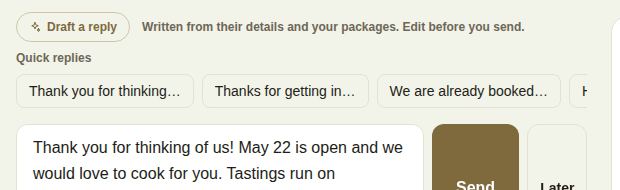
Draft a reply (Pro and Studio)
For couples on The Veil, Draft a reply writes a first draft from their details, your packages and your FAQ, and puts it in the box. Read it and edit it before you send; nothing goes out until you press Send.
Send it later
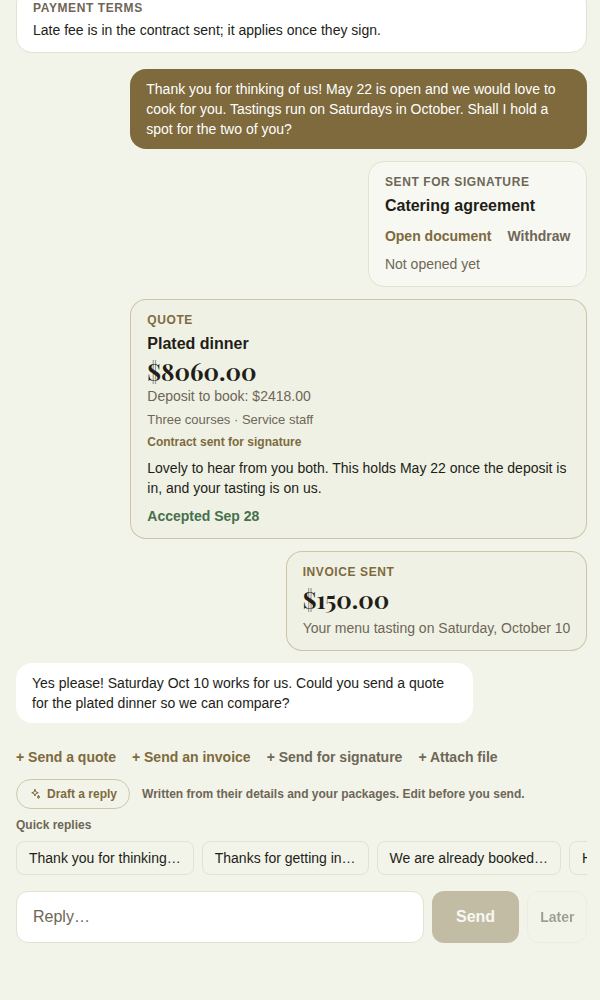
Next to Send, Later offers This afternoon, 5 PM (before 4 PM), Tomorrow, 9 AM, Tomorrow, 1 PM and Monday, 9 AM, or pick your own time and click Schedule. It goes out as you, at that time. See Send later.
More than words
Above the reply box:
- + Send a quote: a package, total and deposit in one message. See Send a quote.
- + Send an invoice: lines, tax and a due date. See Invoices.
- + Send for signature: a contract to sign. See Contracts and e-signing.
- + Attach file: a PDF, Word document or photo (JPEG, PNG or HEIC).
Clients who aren't on The Veil
For a client with no account, the lead shows Their client page instead of a chat. Email {their name} sends your message by email with a link to their page, and their reply comes back onto the lead (under Conversation) and to your inbox. See Clients who aren't on The Veil.
In the phone app
On the lead, write in the box and tap Send. For a couple on The Veil, once a conversation exists, the button reads Continue in the thread and opens it with your text ready. For everyone else the box says Email them, and we email it with their page link. Or send it later: offers Tomorrow 9am, Tomorrow 1pm and Monday 9am.
Your reply time and "Responds fast"
The time from a lead arriving to your first real reply is your reply time. The portal shows your median on Leads, and Reports shows your typical first reply. The Responds fast badge on your page is earned, not bought: at least 5 leads in the last 90 days, at least 80% of them answered, and a median first reply of 12 hours or less. Automatic replies (the "got it" message and your away reply) never count as your reply.
Good to know
- A reply sent from your phone or your computer is the same reply; both show on the lead.
- Opening a lead's conversation clears its unread count in the side rail.
- Automatic help is in Automations and your away reply.
Did this answer it?
Updated September 30, 2026