Help · For wedding businesses · Leads and replies
Archive a lead, and bring it back
Move a lead that didn't book out of your way, record why, and restore it any time.
When a lead isn't going anywhere, archive it. It moves to Archived on Leads, out of your working stages, and the reason you give feeds Why leads were lost in Reports.
Archive a lead
- Open the lead and click Archive in the top corner.
- Pick why, if you know: Budget didn't fit, Date wasn't free, Went with someone else, Stopped replying or Something else. Tap it again to clear it. A reason is optional.
- Add a note if it's worth remembering.
- Click Archive.
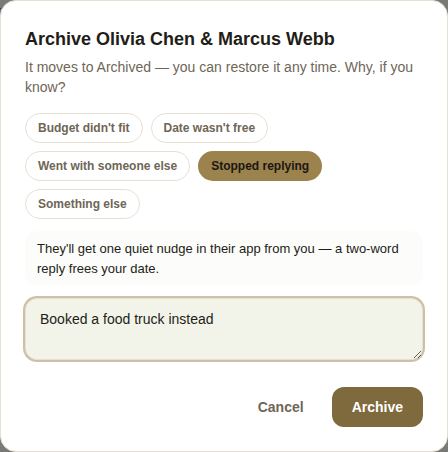
"Stopped replying"
If the couple is on The Veil and you choose Stopped replying, they get one quiet notification in their app from you. A two-word reply from them frees your date for someone else. Clients without an account don't get this nudge.
What archiving does
- The lead moves to Archived, with its reason as a label on the card.
- Any date hold it had ends, and the next lead in line on that date moves up.
- Nothing is deleted: the conversation, invoices and documents stay on the lead.
Bring it back
Open the archived lead and click Unarchive. It goes back to Waiting on them if you had replied, or Needs reply if you hadn't, and the lost reason is cleared.
Finding archived leads
Open the Archived tab on Leads. Each card shows Closed and the reason, such as Budget or Went elsewhere. Search looks through archived leads too, so typing a name finds them without switching tabs.
Why the reason matters
Over a season, the reasons tell you something. Lots of Budget didn't fit may mean your starting price needs saying earlier on your page. Lots of Date wasn't free is a case for second holds. Lots of Stopped replying says reply faster or follow up. Reports counts them for any period under Why leads were lost.
Good to know
- A booked lead can't be archived. To end a booking, use Cancel booking. See Cancel a booking.
- Coordinators, managers and owners can archive leads they can see.
- Archiving doesn't tell a client without an account anything. If you want them to know, email them from their lead first.
Did this answer it?
Updated September 30, 2026