Help · For wedding businesses · Leads and replies
Send later, and what's scheduled
Write a message or quote now and have it go out at a better time, as you. See, cancel or dismiss anything waiting on a lead.
Answering at 11pm is fine; sending at 11pm isn't always. Later lets you write now and send at a time you choose.
Schedule a message
- Write your reply on the lead.
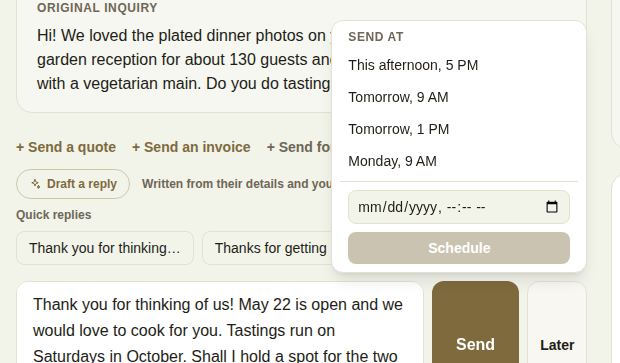
- Click Later next to Send.
- Pick This afternoon, 5 PM (offered before 4 PM), Tomorrow, 9 AM, Tomorrow, 1 PM or Monday, 9 AM (when Monday isn't tomorrow). Or choose a date and time and click Schedule.
The message goes out at that time, as you, exactly as if you had pressed Send. For a couple on The Veil it lands in their app; for a client without an account it's emailed with their page link.
Schedule a quote
In Send a quote, click Later instead of Send quote. If you attached one of your contracts, it is built and saved now, exactly as it will be sent, and goes to sign at the scheduled time just before the quote.
See what's waiting
Everything scheduled on a lead is listed under Scheduled, above the conversation: when it goes, what it is (a message, a quote with its total, or an away reply), and who scheduled it if it wasn't you. Cancel stops it.

If something couldn't be sent, it shows Didn't send with the reason, and Dismiss clears it. The most common reasons are a client with no email address, or a teammate who scheduled it and can no longer see the lead.
In the phone app
Under the reply box, Or send it later: offers Tomorrow 9am, Tomorrow 1pm and Monday 9am. Scheduled messages are listed under Waiting to send on the lead, with Cancel.
Limits
- Pick a time at least a few minutes from now and within six months.
- A lead can have up to 20 sends waiting.
- Scheduled sends go out within about five minutes of the time you chose.
Troubleshooting
- "Pick a time at least a few minutes from now, and within six months."
- "Write the message first."
- "This lead already has 20 sends waiting.": cancel one you no longer need.
- "This client has no email address to send to.": add their email to the lead, or send the link yourself.
- "You can't send on this lead.": you don't have access to it any more.
Tips
- Answer late at night, send at 9 the next morning. It reads as attentive, not sleepless.
- Schedule the follow-up you'd otherwise forget, such as "How did the tasting go?" for the Monday after.
- Your team sees what you've scheduled on the lead, so nobody sends the same thing twice.
Did this answer it?
Updated September 30, 2026