
Wedding planning, shared live
One wedding.
Everyone on it.
You, your partner, your guests and every vendor work on the same wedding, in real time.
Lock the guest list and your caterer has the final count. Move a table and your venue sees it. Push dinner back fifteen minutes and every guest’s phone knows.
Free to plan a whole wedding on iPhone, Android and the web. The Veil Plus adds the tools for the day itself.
- You and your partner
- Your co-planners
- Every guest
- Every vendor
The film
One wedding, everyone on it.
Under two minutes: the plan, the passport in your guests’ pockets, your vendors on the same page, and the day itself, photos and film included.
Trouble playing it? Watch it on YouTube.
How it works
Plan it once. Everyone works from it.
Most weddings run on a spreadsheet, a group chat and a dozen email threads. On The Veil there is one wedding, and everyone on it sees the same version.
- 01
You plan it
Guests and RSVPs, a floor plan drawn to scale, the budget, the checklist, the timeline and the music. Your partner has all of it too.
- You
- Your partner
- Co-planners
- 02
Your vendors see it live
Book a vendor and they get the parts they work from. The caterer has the count and the dietary list, the florist the tables, the DJ your music and your Do Not Play list.
- Venue
- Caterer
- Florist
- DJ
- 03
Change it once
Lock the final guest list, move a table, even move the date. Your venue's calendar, every vendor and every guest get the new version. Nobody works from an old PDF.
- Everyone
- 04
The day runs from it
Your venue or coordinator starts each moment and pushes the schedule back when the toasts run long. One update reaches you, every vendor and every guest's phone.
- Coordinator
- Vendors
- Guests
In the app
Everything the wedding needs, in one place.
Each part reads from the same wedding, so a change in one shows up everywhere else.
Guests and RSVPs
One roster for RSVPs, meals and dietary needs. When the replies are in, lock the final list and it goes to the vendors you booked.
A floor plan to scale
Real rooms in feet, or your venue's own room drawn in for you. Drag guests to their seats and keep families together.
Budget, checklist, timeline
A checklist built from your date and budget that ticks itself off as you work. Pay a vendor and it lands in the right budget line.
Music by section
Build each moment, from the processional to the last dance, with picks from the AI DJ. Guests request songs, and your DJ sees your Do Not Play list.
Plan together
Your partner is a full co-host. A day-of coordinator, a planner or a parent gets exactly the parts you choose, and nothing else.
A passport for every guest
Each guest gets their table, the schedule, the photos and day-of updates on their phone. It opens from a link, with no account needed.
Discover vendors
Browse vendors near you and the real weddings they've worked. Your inquiry arrives with your date, guest count and budget already on it.
Messages and payments
One thread per vendor for messages, quotes and contracts. Sign with your finger and pay by card or bank inside The Veil.
Inside the app
The app, screen by screen.
Real screens from the app, in the theme you’re reading in. Here is what each part does.
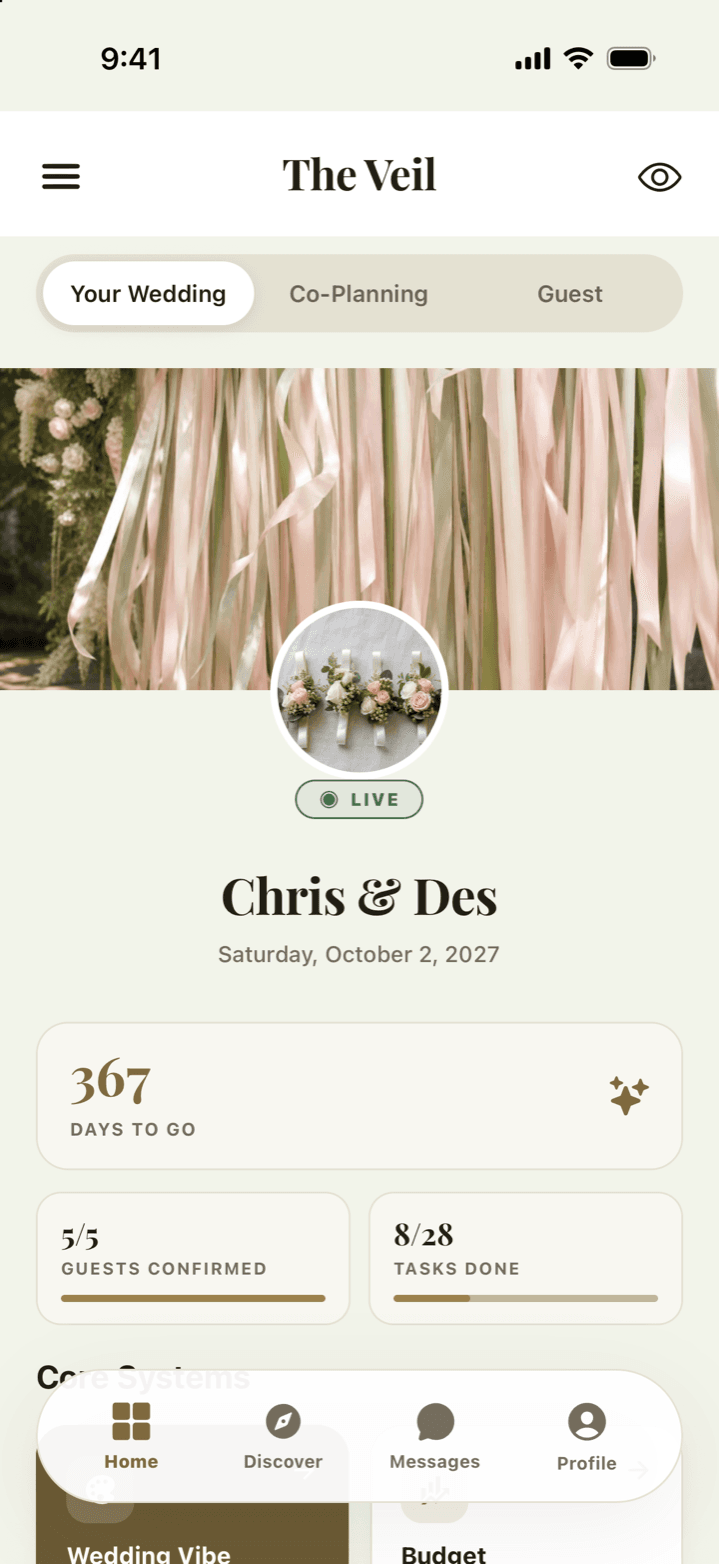
One home for the whole wedding
A live countdown, your confirmed head count and your task progress at a glance, with every part of the wedding underneath. Budget, guests, seating, music, vendors and notes all read from the same wedding, so a change in one shows up everywhere.
- Plan two venues side by side with Plus, and keep the one you book
- Every module remembers who edited what, and when
- Deleted builds go to Trash, not the void
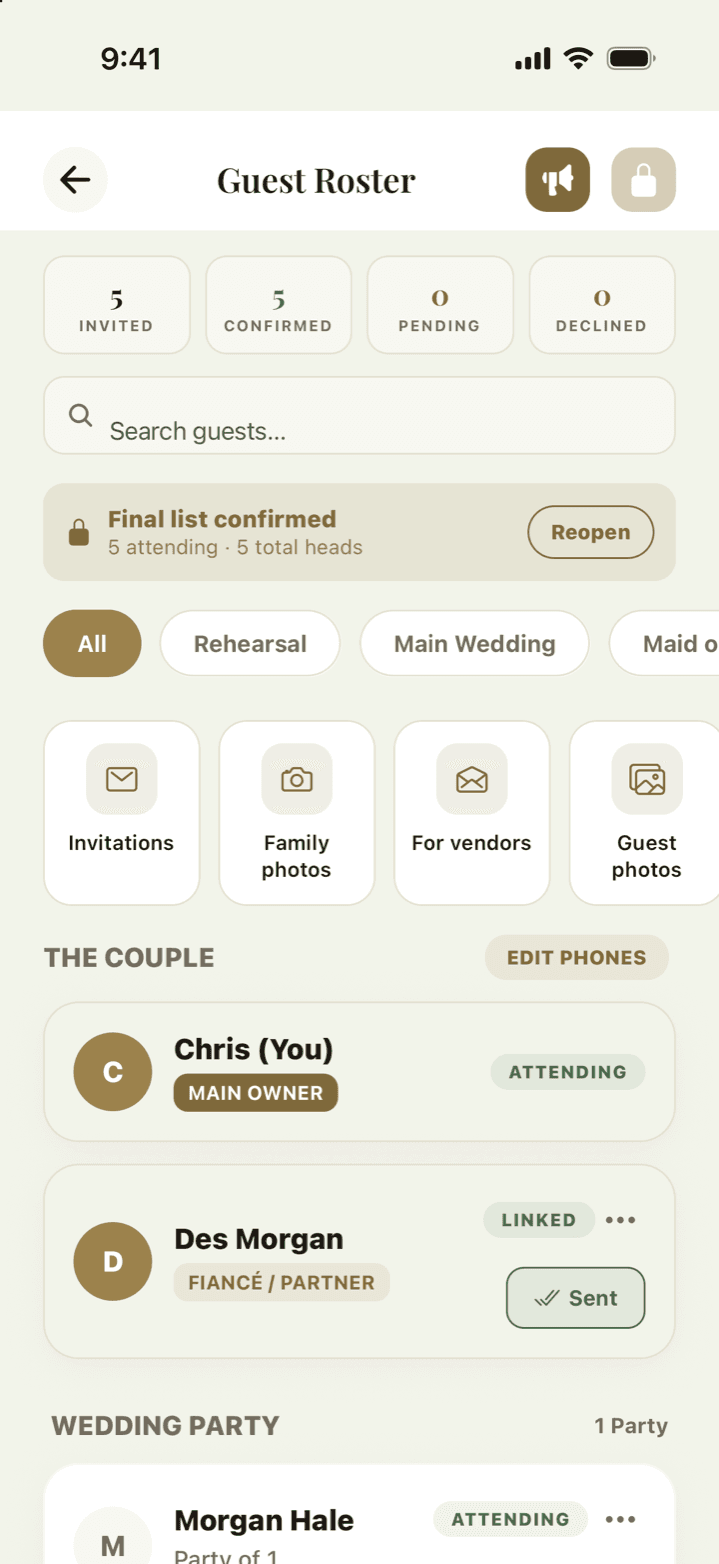
A guest list that chases itself
RSVPs, meals, dietary needs and party sizes in real time, with separate events for the rehearsal and the main day. Message everyone at once. Share one roster code and anyone who scans it asks to join; you approve them and choose their group and events.
- Per-guest invite links and one universal roster code
- Approve or turn away every scan before they reach your list
- Lock the final list and your booked vendors get the names, tables and dietary needs
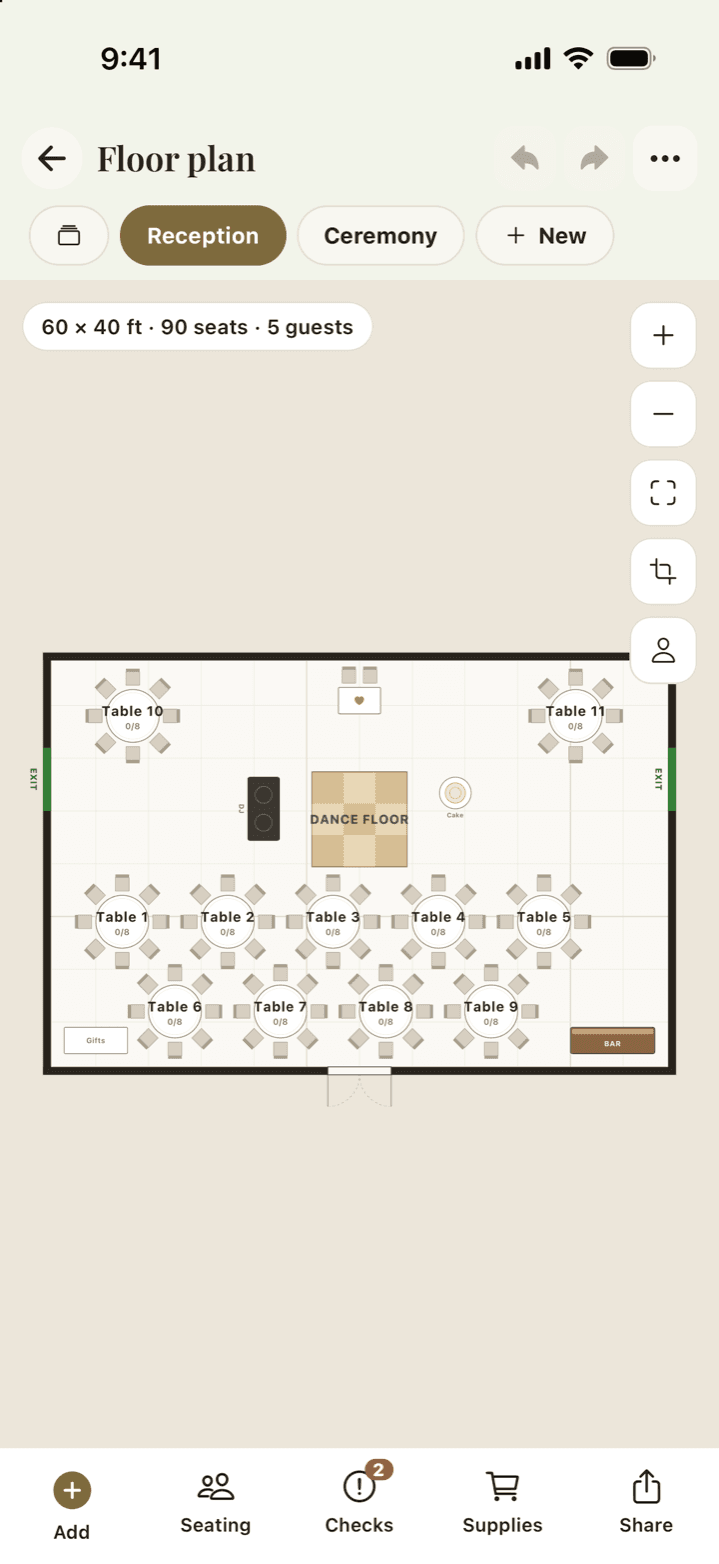
Seating in your venue's real room
Draw your space to scale in feet, or plan in your venue's own room when they're on The Veil. Place rounds, long tables, the bar and the dance floor, then drag guests to their seats. Your venue sees the same plan.
- More than one layout with Plus: ceremony, reception, a rain plan
- Export a picture, or the seating and dietary spreadsheet your caterer asks for (Plus)
- Capacity warnings before you over-seat a table
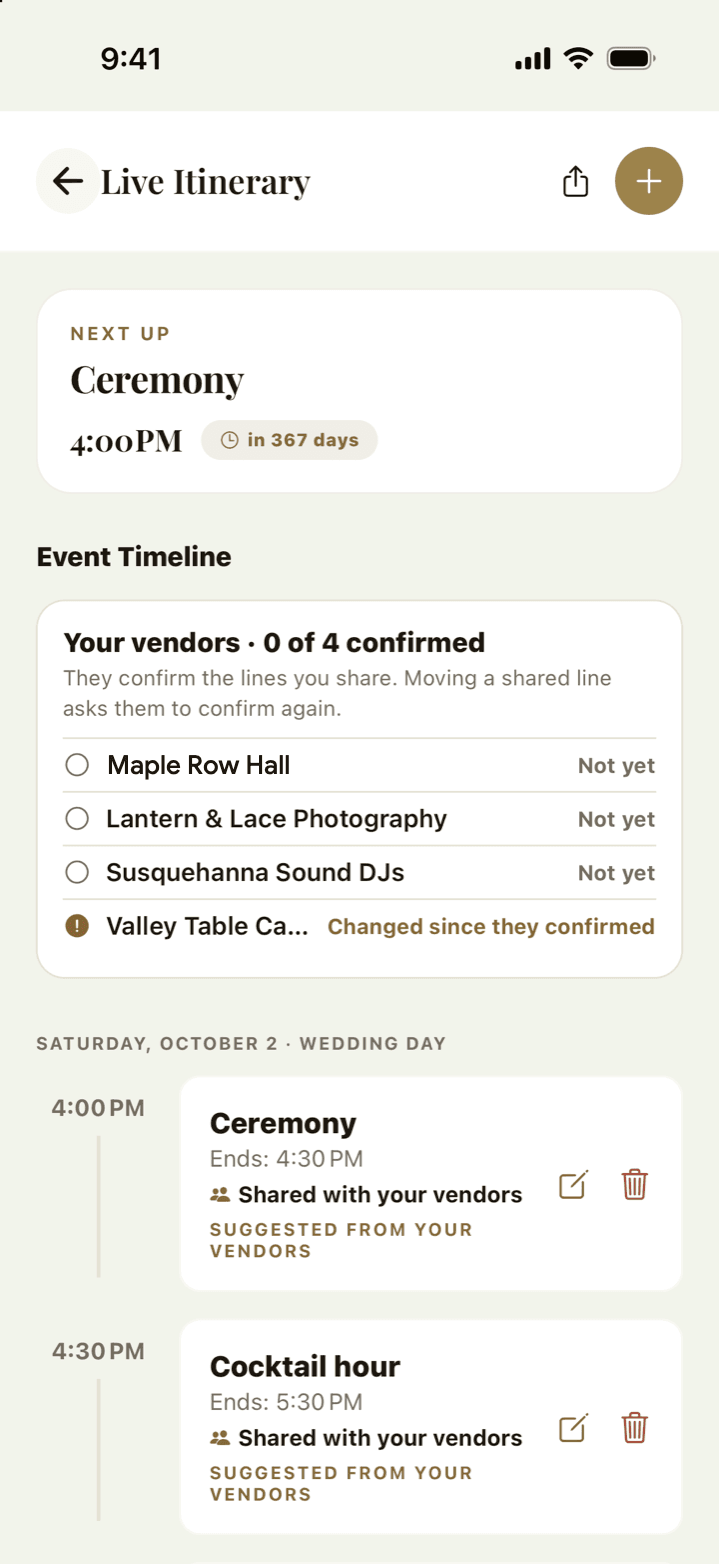
One timeline, read by everyone
Build the run of the day once. Your co-planners see it, your vendors work from it, and every guest gets their part of it in their own passport. When your venue pushes dinner back, the guests' phones know.
- AI drafts a first timeline from your date and venue, then you edit it
- Guests see only their events, on their phone, updating live
- A DIY day-of coordinator can edit it directly on the day (Plus). Your venue's coordinator runs it free
Your wedding website
Not a page for everyone. A passport for each guest.
Every guest gets their own Guest Passport, by email or a link you send. It does what a wedding website does, and it knows who's reading it.
A wedding website
- One page every guest reads, and scrolls to find their part
- A change sits there until someone thinks to check
- The RSVP is a form; meal choices go in an email
- Anyone with the link sees all of it
The Guest Passport
- Opens to their own events, table, dress code and directions
- A change shows on their passport, and on the day it reaches their phone
- They RSVP and choose their dinner, and can sign up to bring a dish
- Each guest's passport is their own. No app, no account
Guest Passport
No. 0142
Maya & Jordan
Saturday 12 June 2027 · Larkspur Hollow
- Guest
- Elena Brooks, +1
- Table
- 7, by the windows
- Dinner
- Herb chicken
- Dress code
- Garden formal
Shuttle moved to 4:15 PM
From the Inn's front steps. Updated an hour ago.
You're bringing: lemon bars, for 40
Your vendors are on it too
Venues and wedding pros plan in the same wedding you do.
- The lead is the wedding
- Your inquiry reaches them with your date, guest count, budget and style on it.
- They work from your plan
- Final count, dietary list, floor plan and music, current the moment you change them.
- Paid inside The Veil
- Quotes, contracts and invoices in one thread. Pay by card or bank.
Everything included
Every feature, and what’s free.
The full list, grouped the way you’ll use it. Everything without a Plus mark is free for good.
Planning
The parts you touch every week between the engagement and the day.
- AI checklist
- A full plan built from your date, venue type and guest count. Tasks tick themselves off as you do the work elsewhere in the app: set a budget, and 'Set a budget' is done.
- Budget & allocations
- Set a total, split it across categories, log every vendor payment and see what's paid versus owed. Reallocate and the rest of the plan updates around it.
- Live itinerary
- The run of the day, hour by hour, across the rehearsal and the wedding. Guests see the parts that concern them; your coordinator works from the whole thing.
- Move the date once
- Change your wedding date and your venue's calendar, every vendor's booking, the run of the day and your reminders move with it.
- Notes hub
- Shared lists and notes that your partner and co-planners can actually edit.
- Wedding vibe board
- Colors, setting, style and must-haves in one place — the thing you send a vendor when they ask what you're going for.
- Multiple buildsPlus
- Plan up to five wedding builds side by side, each with its own venue, budget and guest list. Book one, send the others to Trash, and pull one back if a deposit falls through. The free plan covers one build.
Guests
Where most wedding apps stop at a website and a spreadsheet.
- The Guest Passport
- Every guest gets their own live screen: their events, their table, the dress code, the map and RSVP in one tap. It updates when you change something.
- Roster code & invite links
- One code for the whole wedding, or a personal link per guest. Anyone who scans the open code asks to join; you set their group and events before they land on your list.
- RSVP tracking
- Live counts, party sizes, dietary needs, and separate tags for the rehearsal and the main day.
- Broadcast messaging
- Message every guest at once, or just the wedding party, from the roster.
- Final list lock
- Close the list when the RSVPs are in and decide for anyone who never replied. Your booked vendors get the final names, tables and dietary needs.
- Save-the-dates and invitations, by email
- Pick a design, write a line, choose the day. Each party gets their own page, and a reminder goes to anyone who hasn't answered a week before your deadline.
- Replies with no app
- Guests answer from their own page: who's coming, everyone's name and dietary needs, a note to you. No account, no download.
- One gallery for the whole wedding
- Guests add their photos from the same page, from just before the ceremony to a week after. Your photographer sends the day's photos and your videographer the film, straight into the same gallery and marked as theirs. You choose who sees what. Free holds 24 photos a guest and 750 in all; Plus holds 5,000 and video.
The day itself
The 24 hours the other apps hand back to a spreadsheet and a binder.
- Floor planner
- Your space drawn to scale, in feet, or your venue's real room. Add tables, the bar and the dance floor, then seat everyone in one tap with families kept together.
- Seating & dietary export, and more layoutsPlus
- Save the plan as a picture, download the spreadsheet your caterer asks for (table, seat and every dietary note), and keep more than one layout, like a rain plan.
- A day that tells everyone
- When your venue's coordinator starts a moment or runs fifteen minutes late, your vendors hear, and so do your guests: a notification in the app, or an email to their own page.
- DIY Day-of CoordinatorPlus
- Running the day with a friend, a relative or your own hired coordinator? Give them direct-write access, so their changes land instantly instead of queuing for your approval while you're getting married. Your venue's coordinator runs the day from their side and never needs Plus.
- Emergency contacts & issue logPlus
- Flag the handful of people your coordinator may need to call, and they appear on the passport as a single Call button. Alongside it, a running list of what went wrong and whether it's been resolved — with who flagged it, so nothing is chased twice.
- DIY coordinator access, from their phonePlus
- Your DIY coordinator opens the passport and gets direct-write tiles for the itinerary, guest roster, budget, floor plan, vendors and notes — whichever you granted. Their edits save instantly rather than queueing for your review, because on the day nobody has time to approve anything.
- Day-of modePlus
- On the day, timeline and seating requests from co-planners go to your DIY coordinator instead of you. It turns on around your wedding date by itself, and you can flip it on early for the rehearsal.
Music
A real playlist, not a text file called 'songs (final) v3'.
- AI DJ enginePlus
- Set your genres, eras and vibe, then swipe through picks section by section: prelude, processional, first dance, reception, last song. Your first full run is free. Run it as often as you like with Plus.
- Spotify exportPlus
- Send the finished playlists straight to Spotify for your DJ or your band.
- Guest song requests
- Guests request songs from their passport. You approve what makes the list and close requests when you like. Your DJ sees the songs, never who asked.
- Do Not Play list
- The songs you never want to hear. Your DJ sees the list alongside your music for each section.
Vendors
Find them, talk to them, book them and pay them without leaving the app.
- Vendor discovery
- Browse by category with real local businesses — and a venue that also caters shows up under both, instead of being lost in one.
- Reviews only a paying couple can leave
- See a vendor's rating while you browse — left only by couples who actually booked and paid through The Veil, so it cannot be bought, farmed, or left by someone who never hired them. You are asked about yours once, after the day.
- Real availability
- See which dates a vendor has already blocked before you send a message, so you stop chasing people who were never free.
- In-app chat & files
- One thread per vendor, with photos and documents, instead of a mail folder and three text chains.
- Every vendor, with their money and their paperwork
- One card per vendor: what you've paid, what you still owe, when the next installment is due, and every contract you've signed with them. Vendors you booked through The Veil appear on their own; add the ones you booked elsewhere so nothing lives in a notes app.
- Deposit and balance, not one lump sum
- Vendors set a real payment plan — deposit to hold the date, balance on the day. You see what's coming before it's due. Paid by check or bank transfer? Mark it paid and your budget stays honest.
- Sign the contract in the app
- Your photographer sends the agreement, you sign it with your finger, and both of you keep the signed record — with the date, and a fingerprint of the exact file so nobody can quietly swap it afterwards. No printing, no scanning, no photo of a piece of paper.
- Paid vendors count themselves
- Pay a vendor and the amount lands against the right budget category on its own. No retyping what you just paid so the number comes out right.
- Vendors who work from your plan
- Share your timeline, floor plan, music and final guest list with the vendors you've booked, one switch at a time. Your caterer's quote follows your RSVPs, and nobody asks you for the same number twice.
Registry & gifts
- Universal registry
- Add anything from any store by link, alongside searchable product suggestions.
- Cash funds
- Honeymoon and house funds guests can contribute to by card, paid out to your bank through Stripe.
- Gift tracking
- See what's been bought and by whom, so thank-you notes aren't archaeology.
Together
- Secondary host
- Your partner gets the whole wedding, not a read-only copy — one build, two people, no exports between you.
- Co-planners with real permissionsPlus
- Invite a parent, a sibling or a planner and choose exactly which modules they see. Money stays yours unless you say otherwise.
- Review queuePlus
- A co-planner's edits can queue for your approval rather than landing straight in your plan — you see what changed before it changes.
- Activity log
- Who did what, when, and in which role.
Community
- Discovery feed
- Real weddings from real couples and the vendors who made them. Find an aesthetic you love, then message the vendor from the post.
- Your profile
- Post your own planning and your day, and follow the people whose taste you trust.
- DIY workbenchPlus
- Projects with the materials, the cost and how long they take — and they drop into your checklist so they get a day.
The difference
Other apps stop at the planning. The Veil runs the day.
Most wedding apps cover the months before. The Veil keeps your vendors and guests on the same plan through the day itself.
| Capability | A typical wedding app | The Veil |
|---|---|---|
| What guests get | A wedding website they visit, and a paper insert for the details | A live passport on their phone — their events, their seat, the dress code, the map, updating as you change it |
| Seating | A chart tool, if any — usually a separate purchase | A real floor plan with tables, bar and dance floor, and your guests in their seats, free. Plus adds exports and more layouts |
| Music | A text field for song requests | Your lists for every moment and your guests' requests, free. An AI DJ builds each section with you, and Plus exports it to Spotify |
| Vendors | A directory, then email threads and PDFs for everything after | Booked vendors work from your live plan: the final count, the dietary list, the floor plan and your music |
| Vendor money | A total you type in, and a folder of emailed invoices | Deposit and balance per vendor, with due dates. Card or check, it all lands against the right budget category |
| Contracts | Print it, sign it, scan it, email it back | Sign with your finger in the app. Both sides keep the record, with a hash of the file so a later swap is provable |
| Planning together | One login, shared by two people | Your partner gets the whole build; co-planners get per-module permissions and an optional approval queue |
| The wedding day | You are on your phone, in your dress, answering questions | Your venue or coordinator runs the schedule, and one update reaches you, every vendor and every guest |
| Your data | Monetized — your details are the product. A couple's inquiry is resold as a lead for $50–200, to several competing vendors at once | Never sold, and never resold. A vendor hears from you when you message them, and from nobody else about you |
| Cost | Free tier, then upsells per feature | Free to plan a whole wedding. Plus is monthly, yearly, or $199.99 once for a pass that lasts until your wedding date |
“A typical wedding app” describes the common shape of the category rather than any one product — features move, and we would rather be accurate than pointed.
Pricing
Free to plan. Plus for the day.
The free plan covers a whole wedding. The Veil Plus adds the tools for the day itself. Every Plus plan has the same features, so you only choose how long it lasts.
The Veil Basic
A whole wedding, planned free.
$0 forever
- Checklist, budget, timeline and notes
- Guest list, RSVPs, the final list lock and every guest's passport
- A floor plan to scale, with every guest seated
- Your partner as a full co-host
- Your music by section, guest song requests and a Do Not Play list
- Vendors: Discover, messages, contracts and payments
- Registry and cash funds, paid to your bank (1.5% on cash gifts)
- Your details are never sold to vendors
18+ months out
The whole wedding
$199.99 one payment
Lasts until your wedding date. An annual plan would run out before it.
In the iPhone and Android apps. $199 on the web.
6–18 months out
Annual
$139.99 per year
Covers a year of planning at the lowest cost per month.
In the iPhone and Android apps. $129 on the web.
Under 6 months
Monthly
$14.99 per month
Pay for the months you use, and stop when you're done.
In the iPhone and Android apps. $12.99 on the web.
Every Plus plan includes
- The AI DJ for every section, and Spotify export (your first AI run is free)
- A bigger guest gallery: 100 photos a guest, 5,000 in all, and video
- More than one layout, and a picture of your floor plan
- A DIY Day-of Coordinator who writes directly, on the day
- Coordinator access to every module, emergency contacts and issue log
- Unlimited co-planners with per-module permissions
- DIY food extras: a prep timeline, serving supplies and buffet labels
- Contracts explained in plain words before you sign, and budget benchmarks
- Up to five wedding builds, the DIY workbench, and 0% on cash funds
The plans differ only in how long they last. A shorter one holds nothing back.
Your details are never sold.
Many wedding sites are free because they sell your inquiry as a lead to several vendors at once. We don’t. A vendor hears from you when you message them. The Veil earns from Plus and from the plans vendors choose.
Start free on iPhone, Android or the web, and upgrade when you’re ready.
Straight answers
The questions worth asking first.
Including the ones where the honest answer costs us money.