Help · For wedding businesses · Quotes, contracts and getting paid
Payment reminders
Every client with an unpaid payment gets reminder emails before and after the due date, from your name, with a Pay button. Pause them for one client any time.
You don't need to chase payments by hand. The Veil emails your clients about every unpaid payment that has a due date.
When they go
- When the payment is coming up, with the date for their calendar.
- The day before it's due.
- On the due date.
- Once, if it's three days late.
They go to every client, on the app or not, from your business name, with a Pay button. They stop the moment the payment is paid.
Turn them on or off
Reminders are on for every business to start with. The switch is Email payment reminders in Settings, Automations (Pro and Studio, owners and managers). See Automations and your away reply.
Pause them for one client
Paying by check? Agreed a different arrangement by phone? On the lead, under the invoices, the reminder line reads "Payment reminders are emailed automatically: coming up, the day before, on the day, and once if late." Click Pause for this client. To start them again, click Resume.
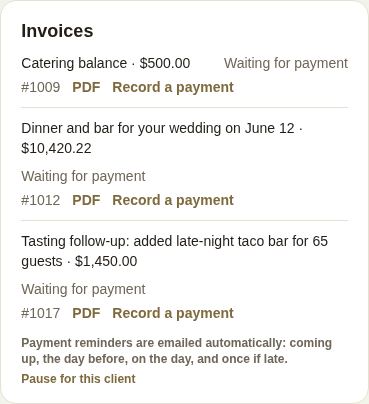
The line tells you when something else is going on:
- "Payment reminders are off for your business." They're switched off in Settings.
- "They turned off payment reminders from their email." The client used the link in the email. Only they can turn them back on. Invoices you send still reach them.
What you see
Each invoice shows when the last reminder went, for example "Reminder emailed Sep 20 (coming up)". An overdue one is highlighted. On a client without an account, automatic reminders also appear in their Conversation as "Automatic reminder".
What the client gets
A short email from your business name: which payment, how much, when it's due, and a Pay button that opens their payment. The first one includes the date for their calendar. A couple on The Veil can also pay from the app.
Good to know
- A payment with no due date gets no reminders. Set due dates on invoices and in payment plans.
- Late fees are separate from reminders. See Payment plans, autopay and late fees.
Did this answer it?
Updated September 30, 2026