Help · For wedding businesses · Quotes, contracts and getting paid
Checks, cash, refunds and cancellations
Mark an invoice paid when a client paid you another way, undo a mistake, and refund all or part of a payment made through The Veil.
Not every payment goes through The Veil. When a client hands you a check or pays by transfer, record it so your books, their budget and your reminders all know. Owners and managers can record payments and refund.
Record a payment
- On the lead, find the invoice under Invoices (or On their page for a client without an account).
- Click Record a payment.
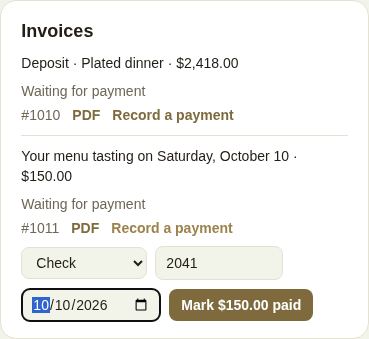
- Choose how they paid: Check, Cash, Bank transfer or Other.
- Add the check number or a reference if you like, and the date it was paid.
- Click Mark $… paid.
The invoice shows Paid and "Paid by check · 2041". A payment plan row shows Paid offline. Reminders stop, and it counts in Marked paid another way on Billing and Offline on the year-end report.
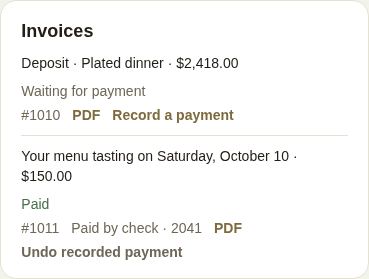
Recorded by mistake? Undo recorded payment puts it back to unpaid.
In the phone app
On the lead, under Invoices, tap They paid me directly, choose Cash, Check, Bank transfer or Other, add a reference and tap Record. "Recorded by mistake? Mark unpaid" undoes it.
Refund a payment
On an invoice paid through The Veil, click Refund.
- Enter the amount. It starts at everything left to refund; type less for a partial refund.
- Add a reason for your records if you like.
- Click Refund.
It comes back out of your Stripe balance and reaches the client in 5–10 days. Stripe keeps its processing fee. The invoice then shows "Refunded" with the amount, and so does the client's page.
Troubleshooting
- "This was paid through The Veil — refund it instead.": you can't record a manual payment on something already paid by card or bank.
- "A bank payment for this is already on its way.": wait for it to clear.
- "Your Stripe balance is too low to cover the refund.": add funds in Stripe, then try again.
- "That's more than is left to refund."
- "Only an owner or manager can do that."
Related
- To end a booking and work out what's owed or refunded, see Cancel a booking.
- For a hold on a client's card against damage, see Damage deposits.
Did this answer it?
Updated September 30, 2026