Help · For wedding businesses · Quotes, contracts and getting paid
Cancellation terms, and cancelling a booking
Set your cancellation terms once, print them into contracts, and let the portal work out what you keep, what to refund and what's still owed when a booking is cancelled.
When a booking is cancelled, the hard part is the maths. Set your terms once and the portal does it for you, the same way your contract says.
Set your cancellation terms
- In Settings, find Cancellation terms.
- Click Start from a common policy (deposit kept, 50% from 90 days, all from 30), or build your own.
- Tick The deposit is non-refundable if it is.
- Each step reads "Within [days] days of the event, keep [percent]% of the total". Add a step adds another (up to eight); × removes one.
- The box underneath shows the clause exactly as it will print. Click Save.
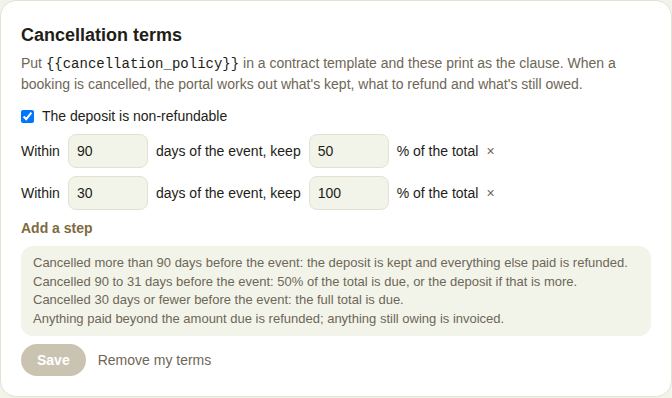
Put {{cancellation_policy}} in a contract template and these print as the clause. Remove my terms clears them.
How the maths works
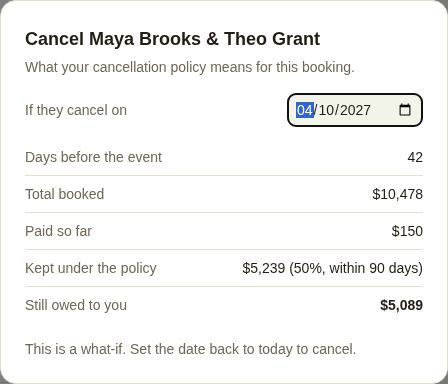
- The step closest to the event applies: with 90 days at 50% and 30 days at 100%, cancelling 42 days before keeps 50%.
- With a non-refundable deposit, you keep that percentage or the deposit, whichever is more.
- More than the furthest step away, you keep the deposit (if non-refundable) and refund the rest.
- Anything paid beyond what's due is refunded; anything still owing is invoiced.
Cancel a booking
Owners and managers can cancel.
- Open the booked lead and click Cancel booking.
- The dialog shows, for today: Days before the event, Total booked, Paid so far, Kept under the policy, and To refund or Still owed to you.
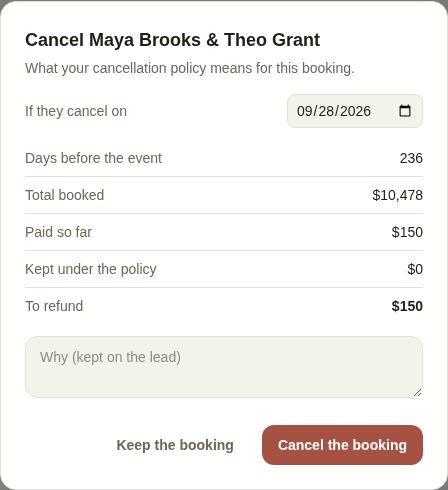
- Want to see what a different date would mean? Change If they cancel on. It's a what-if; set it back to today to cancel.
- Add why (it's kept on the lead) and click Cancel the booking, or Keep the booking.
What happens
- The date is free and nothing more will be collected on the old schedule.
- If a refund is due, you're told how much. Refund it from the paid invoices on the lead; refunds go back the way they were paid. See Checks, cash, refunds and cancellations.
- If more is owed, a cancellation invoice for that amount is ready on the lead. Send it when you've told them.
- The lead moves to Archived.
Good to know
- With no terms set, the dialog warns you that nothing is kept, with a link to Settings.
- A booking can't be archived; cancel it instead.
Did this answer it?
Updated September 30, 2026