Help · For wedding businesses · Quotes, contracts and getting paid
Countersign, and download the signed copy
Add your business's signature after the client signs, and download the original contract with a certificate page that proves who signed what, and when.
Once a client signs, the contract can be fully executed with your signature, and you can download a copy for your records.
Countersign
Owners and managers can countersign.
- Find the contract in the conversation, or under On their page for a client without an account. It says Signed by the client.
- Click Countersign.
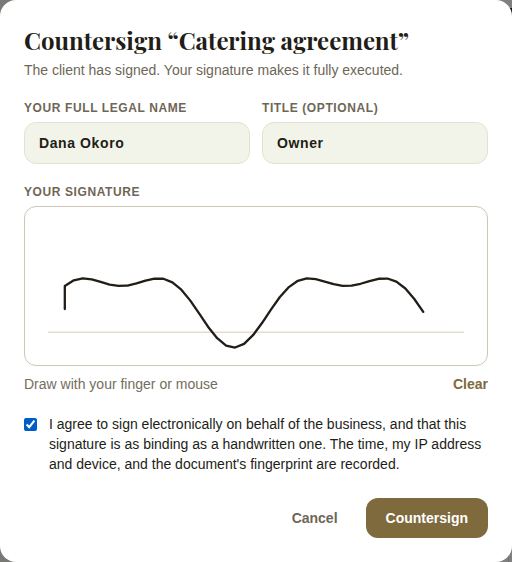
- Type Your full legal name and, if you like, your Title (for example "Owner").
- Draw your signature.
- Tick the box agreeing to sign electronically on behalf of the business. The time, your IP address and device, and the document's fingerprint are recorded.
- Click Countersign.
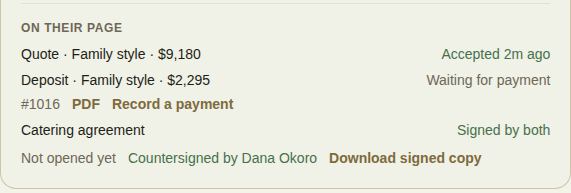
The line changes to Countersigned by your name. The client's page shows it as signed by them and your business.
Download the signed copy
Click Download signed copy. You get the original PDF with a certificate page added: who signed, when, from what device, the countersignature if there is one, and the document's fingerprint. The fingerprint is checked again every time the copy is made; if the stored file no longer matches what was signed, you're told, and the certificate says so.
What the certificate shows
- The document's title and when it was sent.
- The client's name, when they signed and the device they used.
- Your countersignature, name and title, if you added one.
- The fingerprint of the file, and whether the stored file still matches it.
Troubleshooting
- No Countersign link: you need to be an owner or manager, and the client must have signed.
- "We couldn't build the signed copy. Try again.": wait a moment and click Download signed copy again.
Good to know
- Countersigning is optional. The client's signature is recorded either way.
- Opened shows when the client first opened the document. Signing counts as opening it.
- The signed record is also available from View signed record on the contract in the conversation, with Print or save as PDF.
Did this answer it?
Updated September 30, 2026