Help · For wedding businesses · The wedding day
Other vendors and insurance certificates
Bring the other vendors onto an event, show them what they need, and collect their certificates of insurance.
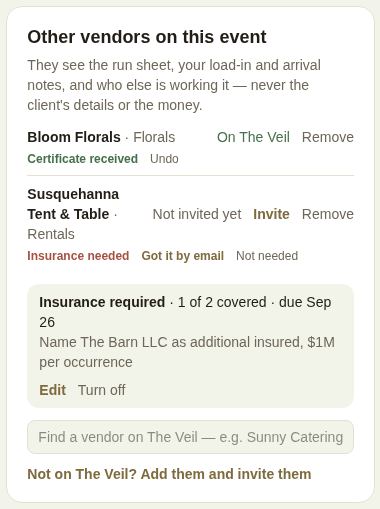
Other vendors on this event, on a booked lead, is where a venue or planner lists the other businesses working it: the caterer, photographer, DJ, rentals. Each one gets its own page for the event.
Add a vendor
- On The Veil: type their name in Find a vendor on The Veil and tap Add. They can see the event in their portal straight away.
- Not on The Veil: tap Not on The Veil? Add them and invite them, enter the business name, what they do and their email, and tap Add and invite (or Add without an email). They're emailed an invitation to join and see the event.
Each vendor shows On The Veil, Invited with when, Not invited yet or No email. Invite or Invite again sends the email; you can send up to thirty invites a day. Remove takes them off.
What they see
Their event page shows the date and guest count, your contact details, Around the day, The numbers if you filled them in, For the day, the floor plan, the run sheet, and who's working it. They never see the client's details or the money.
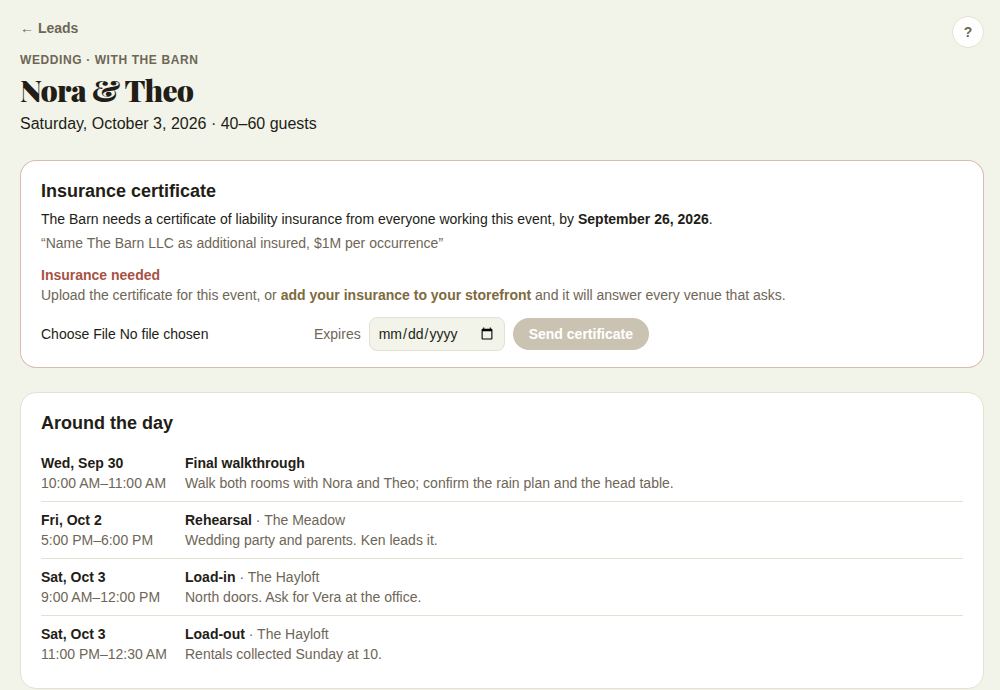
Businesses on The Veil find the events they're working in Events you're working on their Leads page.
Require a certificate of insurance
- Tap Require a certificate of insurance from these vendors.
- Write what it must say, for example "Name The Barn LLC as additional insured, $1M per occurrence", and a Due by date before the event.
- Tap Require it. Everyone on The Veil who isn't covered yet is told.
The box shows Insurance required, how many are covered and the due date. Edit changes it; Turn off stops asking.
Each vendor shows where they stand:
- Insured (on file): the insurance on their storefront covers the event, either checked by The Veil or as they told us.
- Certificate sent: they uploaded one for this event. View certificate opens it.
- Certificate received: you marked Got it by email.
- Not needed: you waived it.
- Insurance lapses before the event or Insurance needed.
Undo clears a received or waived mark.
For the vendor being asked
Their event page shows an Insurance certificate card: who's asking, by when, and what it must say. They upload a PDF, JPG or PNG up to 10 MB with its expiry date and tap Send certificate. If the insurance on their storefront already covers it, there's nothing to do. See Insurance and licenses.
Good to know
- The day sheet lists the other vendors, and marks anyone NOT COVERED when you require insurance.
- For venues and planners, "Certificates of insurance in" is a line on The last 60 days.
- Staff can't add or remove vendors.
- This is your list. Vendors the couple booked through The Veil are listed separately: see Everyone working this wedding and Preferred vendors and rules for outside vendors.
Did this answer it?
Updated September 30, 2026