Help · For wedding businesses · The wedding day
Confirm your run of show
Tell the couple you've read the current day. If they move anything, you're asked again.
Two weeks before a wedding, someone usually emails every vendor the timeline and waits for "confirmed". On The Veil that's one button.
What your run of show is
Under Their run sheet, Your run of show says:
- when you arrive, from the arrival time the couple set on your booking,
- how many of the shared lines are tagged to you,
- how many days away the wedding is, once it's within two weeks and you haven't confirmed.
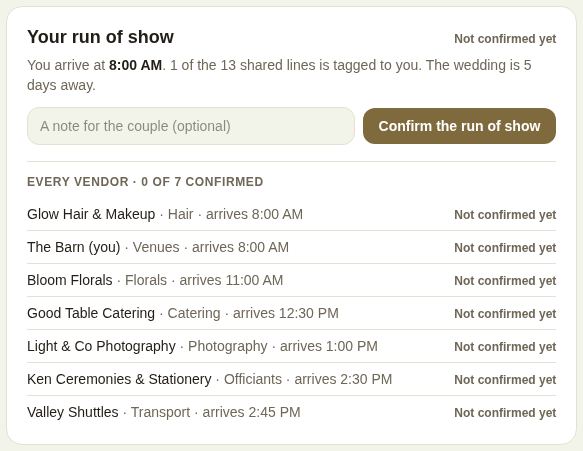
Confirm it
- Read the run sheet above.
- Add A note for the couple (optional), for example "We'll need ten minutes at the gate at 6:20".
- Tap Confirm the run of show.
The label turns to Confirmed, with the date.
When the couple changes the day
What you confirmed is the current version: the shared lines and your arrival time. If the couple moves anything, your status becomes Changed since confirmed, and the box says: "The couple has changed the day since you confirmed. Check the lines above, then confirm again."
Every vendor's status
Venues and planners also see Every vendor: each booked vendor on the wedding, what they do, when they arrive, and whether they're Confirmed, Changed since confirmed or Not confirmed yet, with a count of how many have confirmed. The couple sees the same list.
Good to know
- Coordinators and above can confirm.
- Fourteen days out, every booked vendor who hasn't confirmed the current version gets one reminder.
- The box appears once the couple has shared at least one line.
- For venues and planners, "Run of show confirmed" is also a line on The last 60 days.
Did this answer it?
Updated September 30, 2026