Help · For wedding businesses · The wedding day
Everyone working this wedding
See every vendor the couple booked, when each arrives, and share one thread about the day.
Everyone working this wedding is on every booked lead where the couple plans in the app. Once the couple allows it, you see every vendor they've booked and share one conversation about the day.
Ask for it
Until the couple turns on Let my vendors see each other in their app, the box explains what it does. Tap Ask them to turn it on; the couple sees the request in the app. You can ask once a week.
Once it's on
- Every booked vendor is listed with what they do and when they arrive, from the arrival times the couple set. You're marked (you).
- The vendors' thread is one conversation for all of you. The couple reads it too.
- Type in Message every vendor on this wedding and tap Send.
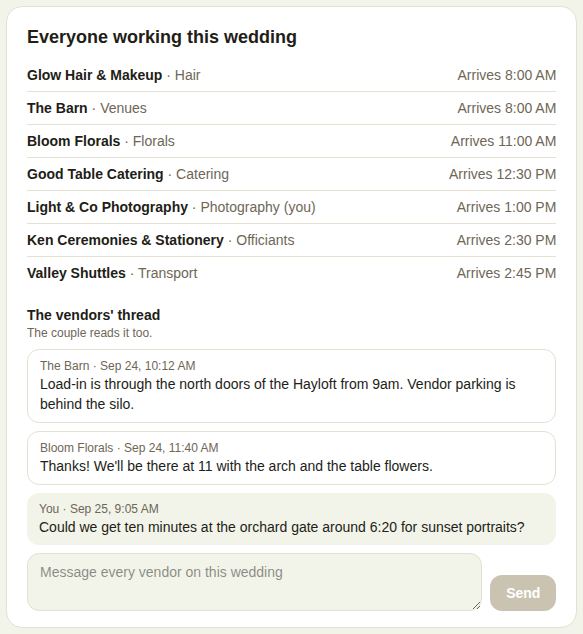
Where the arrival times come from
The couple sets an arrival time on each vendor they've booked. The same time shows on your run of show, on the venue's and planner's list of every vendor, and on Run the day, where the venue marks each of you Arrived. If yours is wrong, ask the couple in the thread or in your own messages.
Good to know
- Use it for logistics: load-in, parking, who needs the power, a ten-minute photo stop.
- Messages are signed with your business name.
- If you send several in a row very quickly, it asks you to give it a minute.
- Vendors a venue or planner adds by hand are a separate list. See Other vendors and insurance certificates.
Did this answer it?
Updated September 30, 2026