Help · For wedding businesses · The wedding day
Walkthrough, rehearsal, load-in and the rain plan
Put the moments around the day on everyone's schedule, and move the wedding indoors in one tap.
Around the day, on a booked lead, is for the moments that aren't part of the wedding's timeline but everyone needs: the final walkthrough, the rehearsal, when you load in and out.
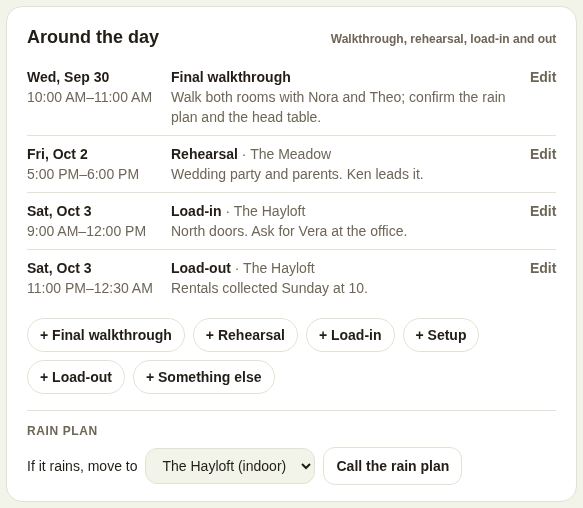
Add a moment
- Tap + Final walkthrough, + Rehearsal, + Load-in, + Setup, + Load-out or + Something else.
- The form starts with sensible defaults: a walkthrough six weeks before at 10 AM, a rehearsal the evening before at 5 PM, load-in on the day at 9 AM, and so on. Change Date, Starts and Ends.
- Name it (optional), for example "Florals load-in".
- Where: one of your rooms, or Not a particular room. (This shows for venues with rooms.)
- Notes: the dock door, who to ask for, what to bring.
- Share with the couple and the other vendors on this wedding is ticked. Untick it to keep it to your team; it's marked Just your team.
- For a new walkthrough or rehearsal, Invite ... by email, with a reminder the day before sends the client an invitation.
- Tap Save.
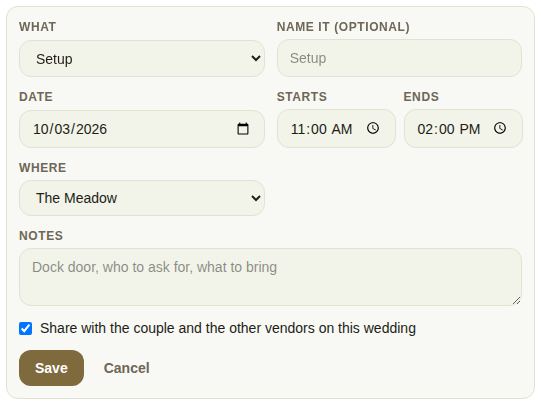
An end time earlier than the start means after midnight, the next morning. Edit changes a moment; Delete is in the form.
Where it shows
- Shared moments sit on the couple's day and on every booked vendor's lead, under From the other vendors.
- Vendors you bring to the event see them under Around the day on their event page.
- Every moment prints on the day sheet.
- For venues and planners, the walkthrough and rehearsal tick off lines on The last 60 days.
The rain plan
For a venue with more than one room, Rain plan sits at the bottom.
- Under If it rains, move to, pick the room the wedding moves to. It has to be a different room from the one booked. The day sheet now says "Rain plan: the Hayloft".
- On the day, tap Call the rain plan. It asks first: the couple, every vendor booked on the wedding and the vendors you brought get a notification now, and the day sheet shows the new room.
- Tap Call it. The box shows Rain plan called with the time, and tells you how many people were told.
- Take it back reverses it.
Once called, the rain room can't be changed until you take the call back. Everyone else sees the called rain plan at the top of their Around the day, and the day sheet puts the rain room's floor plan first.
Good to know
- Owners, managers and coordinators add moments and call the rain plan.
- Every business on the wedding can add its own moments: a florist's load-in, a band's sound check.
- To tell guests too, use Tell everyone on Run the day.
Did this answer it?
Updated September 30, 2026