Help · For wedding businesses · The wedding day
Final count, dietary needs and the final guest list
The number your contract needs by a date, live dietary counts, and every guest by name once the list is locked.
Three sections on a booked lead answer "how many, and who eats what". They appear for venues, caterers, cake makers and planners, and for DJs and bands, decor, rentals and photo booths, who set up for the numbers.
Final count
Set the date your contract needs the final number by.
- Under Final count, pick the date and tap Set the date.
- It goes into the couple's checklist, and the box says how many are attending so far.
- On that date the count locks, and the box shows the number in large type: Locked ... This is the number to plan to.
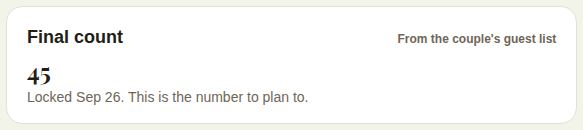
Before it locks you can Move the date or Clear it. If the couple's guest list moves after it locks, the box says by how much, and suggests a message before you order.
Coordinators and above set it. The couple has to be on The Veil.
Dietary
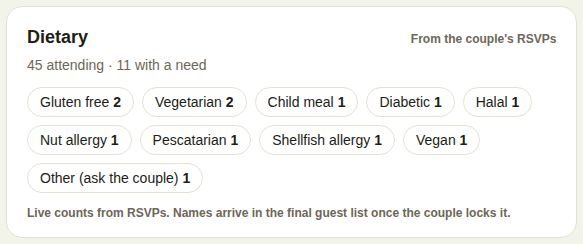
Live counts from the couple's RSVPs, never names: for example Gluten free 2, Vegetarian 2, Nut allergy 1. It says how many are attending and how many have a need. Caterers, cake makers and planners.
Final guest list
Once the couple locks their list (usually the week before), every guest appears by name, with their table and dietary needs. You're notified when it arrives.
- Everyone lists every person, one row each, with the rest of their party indented under them.
- Dietary needs shows only those with a need.
- Guests coming to the rehearsal are marked.
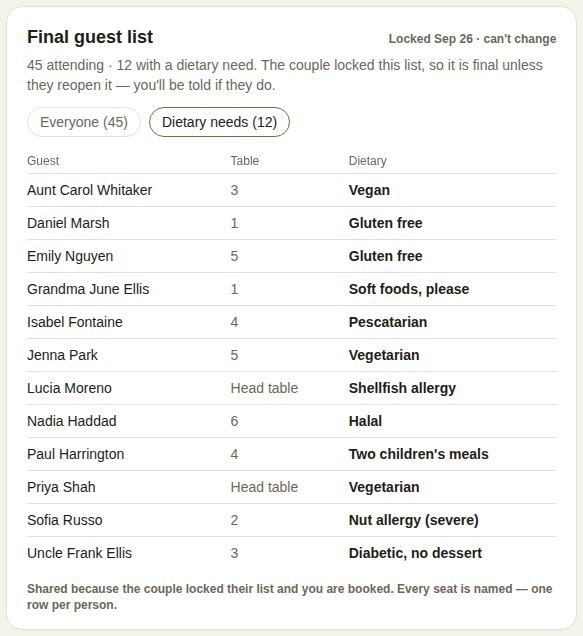
It's final unless the couple reopens it, and you're told if they do.
If the client isn't on The Veil
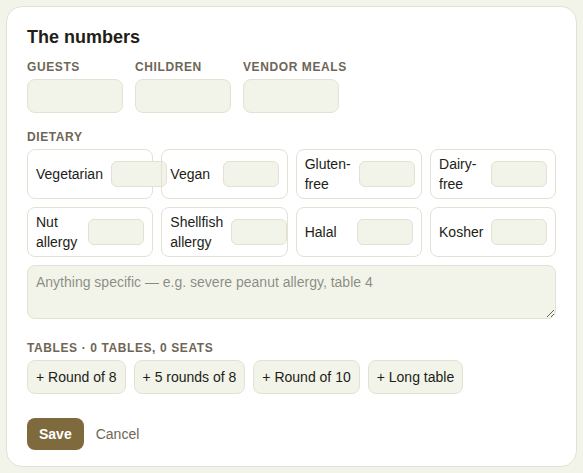
Venues fill in The numbers instead: Guests, Children, Vendor meals, a count for each dietary need, notes (for example "severe peanut allergy, table 4"), and the tables. Quick buttons add + Round of 8, + 5 rounds of 8, + Round of 10 or + Long table; you can rename each, set its seats and shape. Tap Save. It prints on the day sheet and the vendors you bring see it.
Good to know
- All three print on the day sheet.
- Per-guest lines on an invoice follow the count too. See Menus and per-guest pricing.
- For venues and planners, "Final count in" is a line on The last 60 days.
- The couple's side: Lock the final guest list.
Did this answer it?
Updated September 30, 2026