Help · For couples · Your vendors
Plan with your planner, and let your vendors talk
Share your plan with a planner you booked, and let your booked vendors see each other and talk in one thread.
Two switches on your vendor list decide how your booked vendors work together. Both are on Budget, Vendors tab, above your vendors. Only you and your partner can change them.
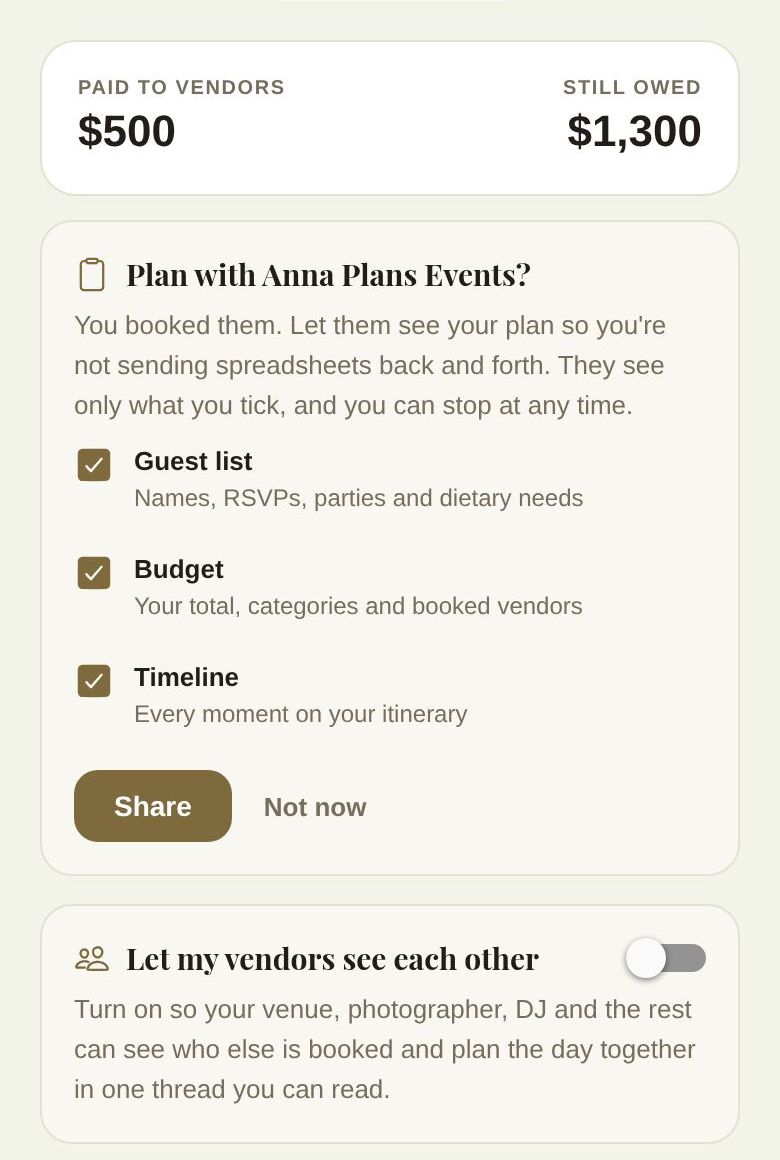
Plan with your planner
When you've booked and paid a wedding planner through The Veil, a card asks Plan with (planner)? Sharing your plan saves you sending spreadsheets back and forth.
- Tick the parts they can see: Guest list (names, RSVPs, parties and dietary needs), Budget (your total, categories and booked vendors) and Timeline (every moment on your itinerary).
- Tap Share. Or tap Not now to decline; you can change your mind later with Share my plan.
Once shared, the card reads Planning with (planner) and lists what they can see, as it is right now. From there:
- Let them make changes: switch this on to let your planner mark RSVPs and edit your timeline for you. You see every change.
- Change what they see: tick or untick parts, then Save.
- Stop sharing: ends it straight away.
Sharing also ends by itself if the booking is refunded.
Let my vendors see each other
Off by default. Switch on Let my vendors see each other, and each vendor you've booked and paid through The Veil can see who else is working your wedding (name, category and arrival time) and talk in one thread about the day.
You can read that thread right on this card, under Your vendors' thread, and write to all of them at once with Message all your vendors.
Your vendors never see each other's prices or your contact details. Switch it off any time.
Good to know
- Vendors you added yourself aren't part of this until they join The Veil and your booking with them is paid. See Vendors you booked elsewhere.
- Co-planners don't see these cards. Deciding who your vendors talk to is yours.
- More on what's shared: What your vendors can see.
Did this answer it?
Updated September 30, 2026