Help · For wedding businesses · Tools for your trade
Planners: the couple's plan
With the couple's permission, see and work in their guest list, budget and timeline.
A planner who's been booked and paid through The Veil can see the couple's own plan, if they say yes. It's the Their plan box on the lead.
Asking
When a couple pays you, they're asked in the app whether you can see their guest list, budget and timeline. Until they answer, the box says so. They choose which parts to share, and whether you can make changes. They can change their mind any time from Vendors in their app.
If they decline, the box says so. When the booking ends, access ends with it.
What you see
Tabs for each part they share:
- Guests: attending, not replied and declined counts, a search, and every party with their group and size. If they let you make changes, you can set each RSVP to Coming, No reply or Declined. Once their final count locks, the list can't change.
- Budget: their total, how much is allocated, each category, and the vendors booked on The Veil with what they cost.
- Timeline: their day. With permission, + Add to their timeline and Edit change it: what, date, start and end, where, and whether it's shared with their vendors. Save to their timeline.
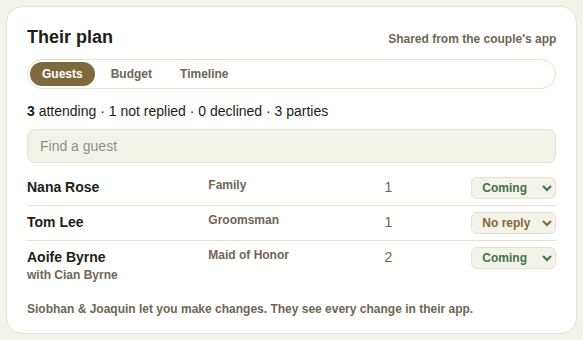
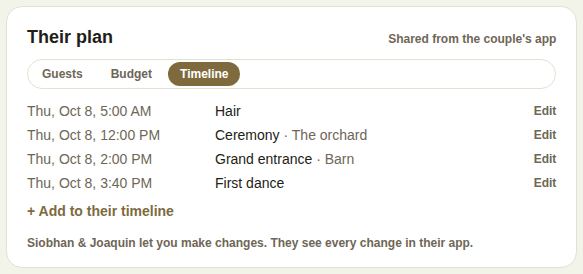
The bottom says whether the couple lets you make changes; they see every change in their app.
Good to know
- Planners also get most of the other sections: dietary counts, the final guest list, family photos, shuttle stops, envelopes, place cards, introductions, the ceremony, the light and the last 60 days. See What the couple shares with you.
- Planners can run the day, like venues. See Run the day.
Did this answer it?
Updated September 30, 2026