Help · For wedding businesses · Tools for your trade
The music plan (DJs and bands)
The couple's songs by moment, the do-not-play list, guest requests and the introductions, ready for your software.
DJs and bands get Music and Introductions on a booked lead, straight from the couple's app.
Music
Once the couple turns on Share with your vendors on their Music screen, you see:
- Do not play, boxed at the top.
- Each moment they've chosen songs for: Prelude, Processional, Recessional, Cocktail Hour, Grand Entrance, First Dance, Parent Dances, Dinner, Open Dance Floor, Cake Cutting, Bouquet & Garter and Last Dance. Where the couple's run sheet has a matching moment, its time shows beside it, for example "First Dance · 7:30 PM".
- Guest requests: each song guests asked for, with how many asked (for example ×3), and Couple approved where the couple said yes. Never who asked.
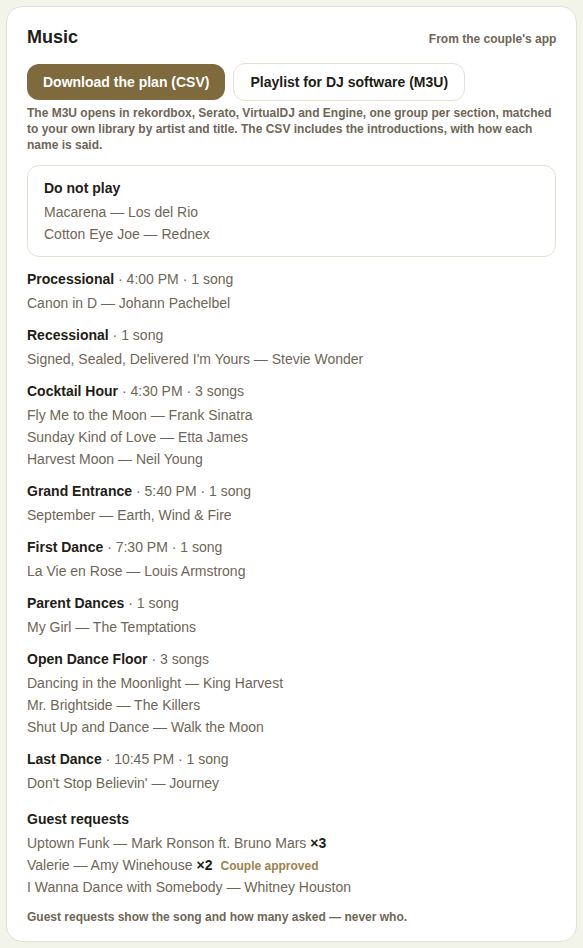
Take it into your software
- Download the plan (CSV): every moment, song and time, the guest requests, and the introductions with how each name is said.
- Playlist for DJ software (M3U): opens in rekordbox, Serato, VirtualDJ and Engine, one group per moment, matched to your own library by artist and title.
Download again after the couple changes anything.
Introductions
The wedding party in the order they walk in, each with their role and Say it: where the couple added how a name is said, then the couple themselves.
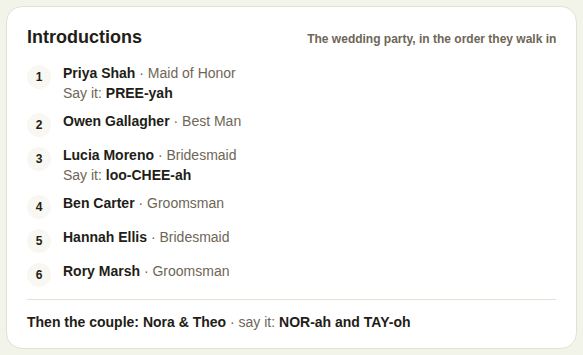
It's filled from the couple's guest list: people in Maid of Honor, Best Man, Bridesmaid, Groomsman or Wedding Party, put in order under For your vendors in their app. Anyone who can't come is left off. Officiants and planners see it too.
Good to know
- Both print on the day sheet.
- If a section says the couple hasn't shared it yet, it appears the moment they do.
- Put your own timing notes in For the day, for example where you plug in and when music has to stop. See For the day: your BEO.
Did this answer it?
Updated September 30, 2026