Help · For wedding businesses · Tools for your trade
The shuttle manifest (transport)
How many guests are staying at each hotel, who they are, and the runs you've planned for them.
Transport businesses and planners get Shuttle stops on a booked lead: the hotels guests are staying at, how many at each, and your runs.
Where the numbers come from
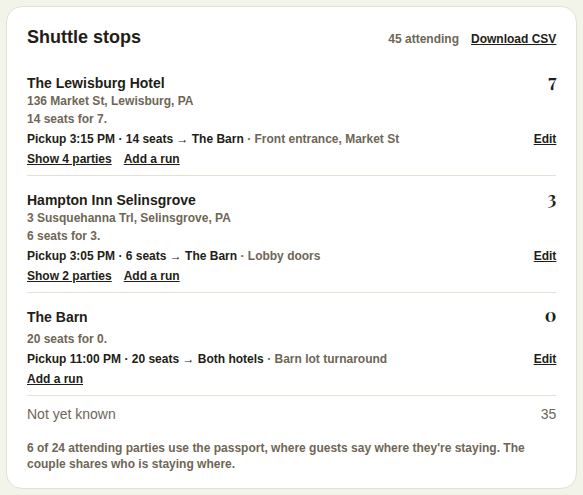
Guests say where they're staying in their wedding passport. Each hotel appears with how many are staying there, and how many haven't replied yet. Hotels the couple picked for a room block are marked Couple's pick; ones nobody has chosen yet are listed at the bottom. Not yet known counts the attending guests who haven't said.
The note at the bottom says how many attending parties use the passport, so you know how complete it is.
Names
By default you see counts only. If the couple turns on Where guests are staying under For your vendors in their app, each stop gets Show ... parties: every party by name with its size, and "not replied" where that's so. See Where guests stay and shuttles for the couple's side.
Plan your runs
- Under a stop, tap Add a run (or use Add a run at the bottom).
- Stop: pick a hotel, or type another, for example "The Barn" for the ride home.
- Destination, Day, Pickup time, Seats (1 to 200) and Notes, for example "Front entrance, Market St".
- Tap Save run.
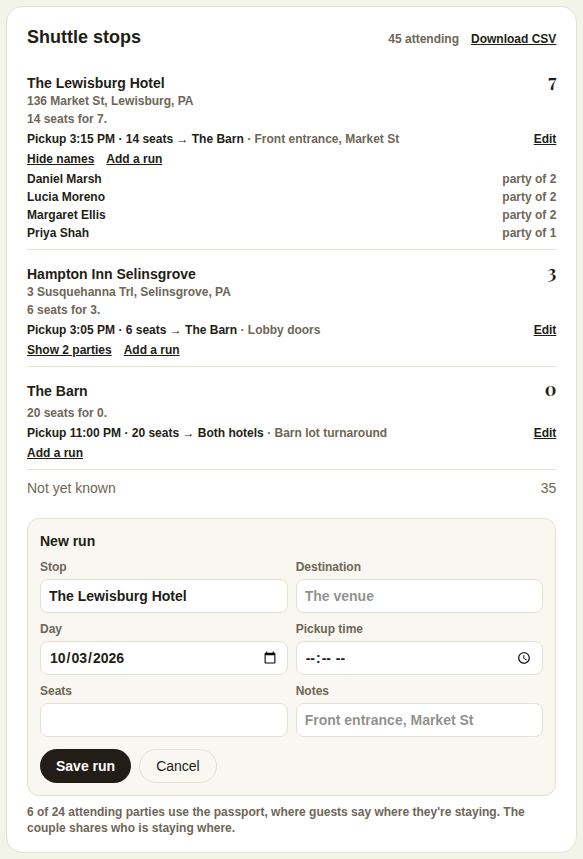
Each stop then says whether you have enough seats: "14 seats for 7", "short by 3" in red, or enough for those attending but not for everyone who hasn't replied. Edit changes a run; Delete run removes it. One wedding holds up to 40 runs.
Download and print
- Download CSV gives every stop, its address and pickups, and each guest with their party size and RSVP.
- The day sheet prints each stop with its runs and, when names are shared, a checkbox list for the driver.
Good to know
- Coordinators and above add and change runs. Crew on the wedding can see them.
- The run sheet shows the couple's shuttle times. Put yours in the notes if they differ, and tell the couple.
Did this answer it?
Updated September 30, 2026