Help · For wedding businesses · Getting started
Change your plan, add logins or cancel
Moving between plans, adding and removing Pro seats, your receipts, and what happens when you downgrade.
Everything about your subscription lives on Billing, next to the plan it changes. Only the owner can change the plan.
See your plan
Open Billing and scroll to Plan. The card you're on says Your plan and shows Manage subscription. The other cards say Included in your plan or offer to upgrade. The line under Plan says when it renews.
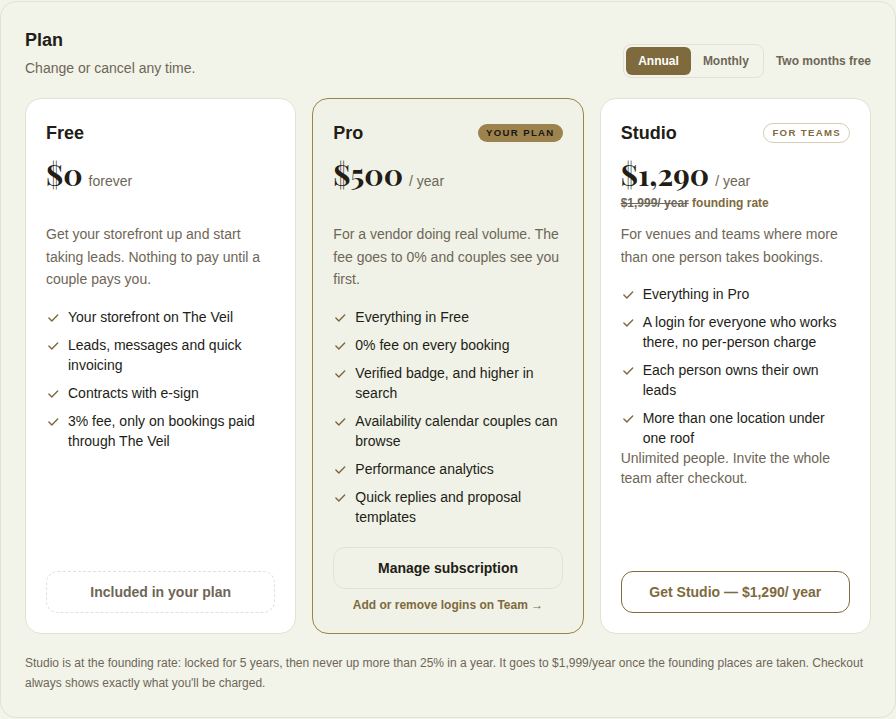
Manage subscription
Manage subscription opens Stripe's billing page for your business. There you can:
- update your card,
- see and download receipts and invoices,
- cancel.
On Free with a past subscription, the same page is under Billing history.
Move up a plan
- Free to Pro or Studio: choose Go Pro or Get Studio and pay in checkout.
- Pro to Studio: choose Get Studio. Your team keeps their logins, and Studio has no seat limit. A Pro founding rate doesn't carry over to Studio; see Founding rates.
Add or remove logins on Pro
Pro includes one login and allows up to two extra seats, at $250 a year each ($25 a month on monthly billing).
- Open Team (from Add or remove logins on Team on Billing, or the Team tab once you have more than one seat).
- Under Seats, choose Add a seat. The difference is prorated on today's invoice.
- To give one back, remove the person first, then choose Remove a seat. The unused time is credited.
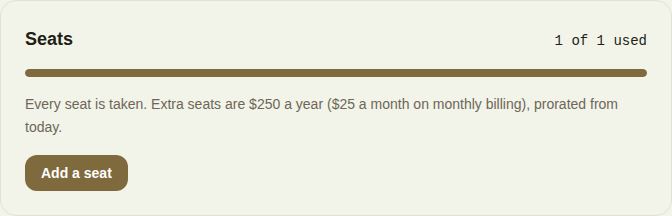
At three logins the portal says That's Pro's limit and points you to Studio. Studio has no seats to buy.
Downgrade or cancel
Cancel under Manage subscription. Stripe shows the date your plan ends. From then, your business is on Free.
On Free:
- The 3% fee applies again to bookings paid through The Veil.
- The Verified badge and the availability calendar come off your page.
- Pro editors (quick replies, proposal templates, contracts, automations, QuickBooks) are locked, with See Pro on each. What you wrote is kept.
- Nobody is removed from your team. If more people have access than your plan includes, Team says so and no leads are lost; nobody new can be added until you move up a plan or take someone off.
Troubleshooting
- "This plan isn't billed through Stripe yet, so seats can't be changed here." Write to us under Help.
- "Your subscription isn't active. Check Billing." Your last payment didn't go through. Update your card under Manage subscription.
- "Someone is still in that seat." Remove them from the team first. See Remove someone from your team.
Did this answer it?
Updated September 30, 2026