Help · For wedding businesses · Calendar and tours
Spaces, rooms and floor plans (venues)
Your rooms, what each one holds, and how each event gets its own floor plan from them.
If you're a venue, The Veil treats each of your rooms as its own thing to sell. Draw a room once and every event booked in it starts from that drawing, which you and the couple then plan in together.
This article is the overview. Each part has its own article: Draw your rooms, Rates and minimums by room and season and The event's floor plan.
Your spaces
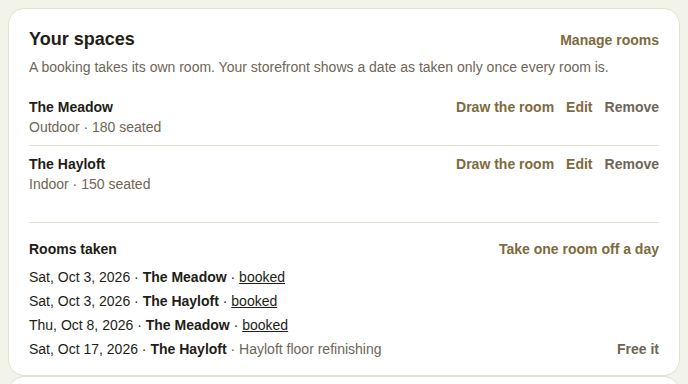
On Availability, Your spaces lists each room with its setting and capacity, for example "Outdoor · 180 seated". For each one:
- Draw the room opens its drawing.
- Edit changes the name, Seated and Standing capacity and Setting (Indoor, Outdoor or Covered).
- Remove takes it off your list. Past events keep its name.
Manage rooms opens the Rooms page, where you can add rooms, draw them and put them in order.
One room, or several
With fewer than two rooms, the calendar works as it always has: a booking closes the day.
With two or more, a booking takes its own room, so you can sell the garden on the day the barn is booked. Your public page shows a date as taken only once every room is.
Set a lead's room under Space in The day box on the lead. It lists your rooms and Whole venue / not set.
Rooms taken
With two or more rooms, Rooms taken lists each date a room is booked (with a link to the lead) or blocked by hand (with your reason).
- Take one room off a day picks a room, a date and Why (optional), then Take it off. Use it for maintenance, a private dinner, or anything that closes one room but not the others.
- Free it opens a hand-blocked room again. Booked rooms are freed by the booking, not here.
Coordinators can take a room off a day and free it; changing the rooms themselves is for owners and managers.
Holds and rooms
Holds queue per room: a first hold on the Hayloft doesn't stop a first hold on the Meadow the same day. See Holds.
Good to know
- Rooms, rates and floor plans appear for businesses listed as a venue.
- Owners and managers add, edit and draw rooms. Coordinators and above can start and work on an event's floor plan.
- Rooms aren't a paid add-on. Blocking whole dates on the calendar is part of Pro.
Did this answer it?
Updated September 30, 2026