Help · For wedding businesses · Calendar and tours
Availability and blocking dates
Close the days you can't work so couples never ask about them, and see what's already taken (Pro).
Availability is the calendar in the left-hand menu of the portal. Every date you block is closed on your public page, closed for tour bookings, and can't carry an open-date offer. Everything you don't block stays open. It's for owners and managers on Pro or Studio.
Block a date
- Open Availability. The month opens on today; use the arrows either side of the month name to move.
- Tap a day. Past days are greyed out and can't be picked.
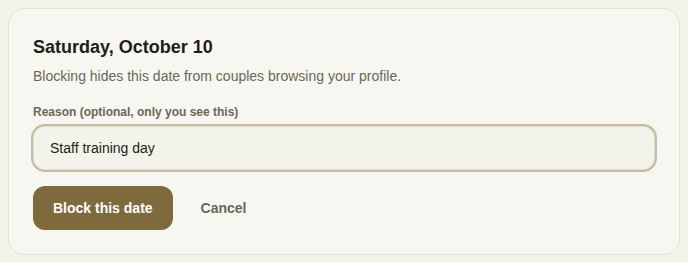
- A panel opens under the calendar with the date written out. Type a Reason (optional, only you see this), for example "Booked", "Vacation" or "Staff training day". It holds up to 120 characters.
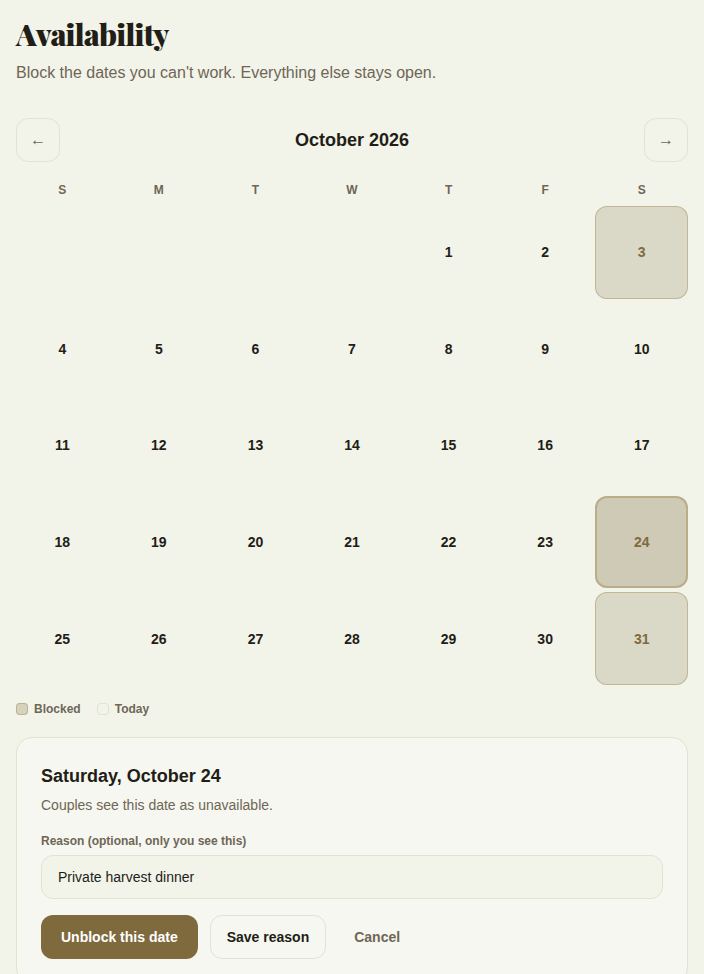
- Tap Block this date. The day turns shaded, and the key under the grid shows Blocked and Today.
Nothing is blocked by a single tap on purpose: a mis-tap would close a date a couple is shopping for, and you'd never know. The panel is the confirmation.
Change or open a blocked date
Tap a shaded day. The panel says Couples see this date as unavailable and shows your reason.
- Unblock this date opens it again straight away.
- Save reason keeps it blocked with the new wording.
- Cancel closes the panel without changing anything.
If you keep the page open on a laptop while you work on your phone, tap Refresh under the grid to pull in anything changed elsewhere.
Dates that block themselves
- Booked leads. When a lead is marked booked, its date is blocked for you with the reason "Booked via The Veil". You don't need to do anything.
- Venues with two or more rooms. A booking takes only its own room. The whole day is blocked, and shown as taken on your page, only once every room is taken. See Spaces, rooms and floor plans.
- Your other calendars. Days your Google Calendar, Outlook or a pasted calendar link say you're busy are blocked here too. A day blocked by one of them says which in the panel and can't be unblocked here: move or delete the event in that calendar and it clears within six hours. See Sync with the calendar you already use.
What couples see
On your public page, Pro and Studio businesses get an Availability box: a month calendar couples can page through, with a note that Struck-through days are unavailable. They see the date only, never your reason. They can look up to a year ahead.
Blocked dates are also left out of your tour and call slots (Tours, tastings and calls), and you can't put an offer on one (Offer the dates you're still trying to fill).
Also on this page
- Your spaces and Rates and minimums, for venues. See Spaces, rooms and floor plans and Rates and minimums by room and season.
- Dates on hold: every date with a hold on it, and its queue of first, second and third holds. Holds are placed, extended and released from the lead. See Holds.
- Dates you're still trying to fill, Tours & calls and the calendar links, each with its own article linked above.
On your phone
In The Veil Vendors, open Calendar, then Block dates (or More, then Block dates). Tap a day in the month, type Why (only your team sees it) and tap Block this date. Tap a blocked day and Open this date back up to unblock it. The list Blocked from today shows every block still to come. See Your calendar in the phone app.
Good to know
- Blocking is a Pro feature. On Free the calendar is locked, and your page doesn't show an Availability box at all, so couples are never shown a month of "open" days nobody is keeping.
- Only owners and managers can block or unblock. Coordinators can see the calendar, and venues' coordinators can take a single room off for a day under Your spaces.
- If your plan lapses from Pro, your blocks stop showing to couples. They're still there for you when you come back.
Did this answer it?
Updated September 30, 2026