Help · For couples · Floor plan and seating
Share your floor plan with your vendors
Let your caterer, rental company and other booked vendors see the plan you drew, so they set it the way you planned.
Your caterer and rental company set up the room from a plan. Sharing yours means they work from the same drawing you do.
Turn sharing on
- Open your plan and tap Share in the toolbar.
- Turn on Share with my vendors.
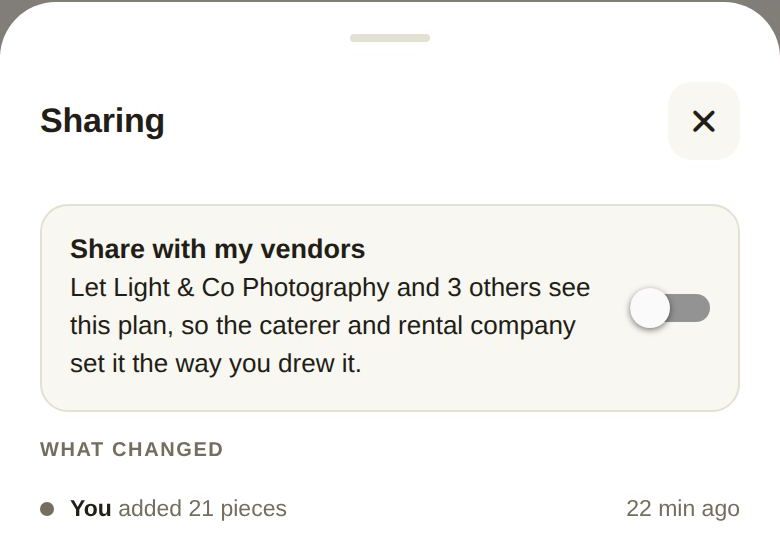
The card names who will see it, for example your photographer and three others. Once on, it says they can see the plan, and seat counts, never names.
Sharing is free, and it's per plan. In All your plans, a shared plan is marked Your vendors can see it.
What they see
- The space, every piece, and its size and position.
- How many seats are taken at each table.
- Not your guests' names. Those stay with you until you lock your final guest list, when your caterer and venue see each guest's table and dietary needs.
Only businesses you've booked and paid on The Veil see a shared plan.
Planning in your venue's room
A plan you share with your venue works differently: it's live for both of you from the start, and the button reads Venue instead of Share. See Plan in your venue's room.
What changed
Under the switch, What changed keeps a history of the plan, for example when you added pieces.
Good to know
- Turn the switch off at any time to stop sharing that plan.
- If the switch doesn't change, check your connection and try again.
Did this answer it?
Updated September 30, 2026