Help · For couples · Budget, checklist and timeline
Log costs in a category
Add, edit and delete costs, and see how vendor payments and DIY spending land in each category.
Each budget category is a small ledger: the vendors you've booked for it, and any costs you add yourself. This guide covers everything inside a category.
Open a category
Open Budget from Home, stay on Categories, and tap a category card. At the top, Category Tracker shows what's spent against the category's budget, like "$3,000 Spent / $9,250". The figure turns red and the bar fills red when you go over.
Add a cost
- Tap Log Custom Cost at the bottom of the list.
- Vendor or Item Description: what it's for, such as "Venue deposit" or "Gown, first payment".
- Total Cost ($): the amount, in whole dollars.
- Tap Save Cost, or Cancel.
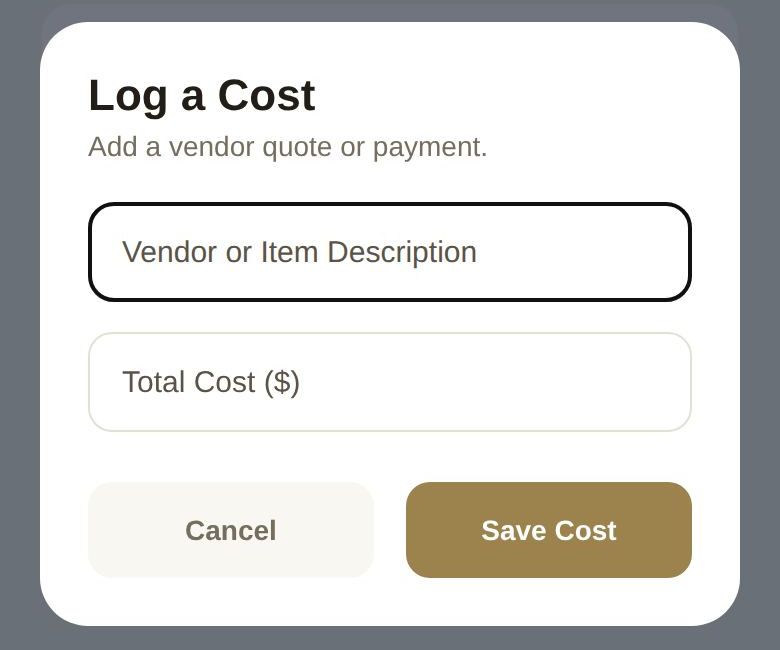
The cost appears in the list and counts toward the category and your Total Spent straight away.
Log what you've paid or committed to, such as deposits, invoices and signed quotes. If you want to compare quotes before choosing, keep them in a private note or on the vendor shortlist instead, so they don't inflate what you've spent. See Compare saved vendors side by side.
Edit or delete a cost
- Tap a cost to reopen it. Change the description or amount and tap Update Cost.
- Tap Delete Item in that window, or the trash icon on the line, to remove it.
What else shows up in a category
- Vendors. Anyone you've booked in this category, through The Veil or added yourself, appears at the top as a vendor card with what's paid and what's still owed. Payments you make through The Veil count toward the category automatically. Your own lines then sit under Other costs.
- AUTO lines. The DIY Projects category gets a line called "DIY projects & materials", kept up to date by the DIY workbench. It's marked AUTO and has no trash icon.
- Pending changes. If a co-planner has asked to add, change or remove a cost, you'll see Pending Add, Pending Edit or Pending Delete on that line until you review it.
Good to know
- Costs are whole dollars. Round to the nearest dollar.
- Costs you log belong to the build you're in. If you keep alternate builds, each has its own costs. See Plan more than one version of your wedding.
- Nothing leaves The Veil when you log a cost. It's your record, and your vendors don't see it.
Did this answer it?
Updated September 30, 2026