Help · For couples · Registry and photos
Your registry and cash funds
Gifts from any store, links to registries you already have, and cash funds paid straight to your bank.
Registry on Home opens your Gift Registry. It brings everything guests can give you into one place: gifts from any store, registries you already have elsewhere, and cash funds for a honeymoon, a home or anything else.
The tabs
- Overview: what you've received so far and your linked stores.
- Discover: find gifts on Amazon, or add one from any store. See Add gifts to your registry.
- Track Gifts: every gift and who gave it.
- Cash Funds: funds guests contribute to. See Cash funds.
- Stores: link registries you already have. See Link registries from other stores.
- Payments: how you get paid. See Get paid: Stripe and payment links.
- Settings: what guests see and what you're told. See Registry settings and notifications.
Overview
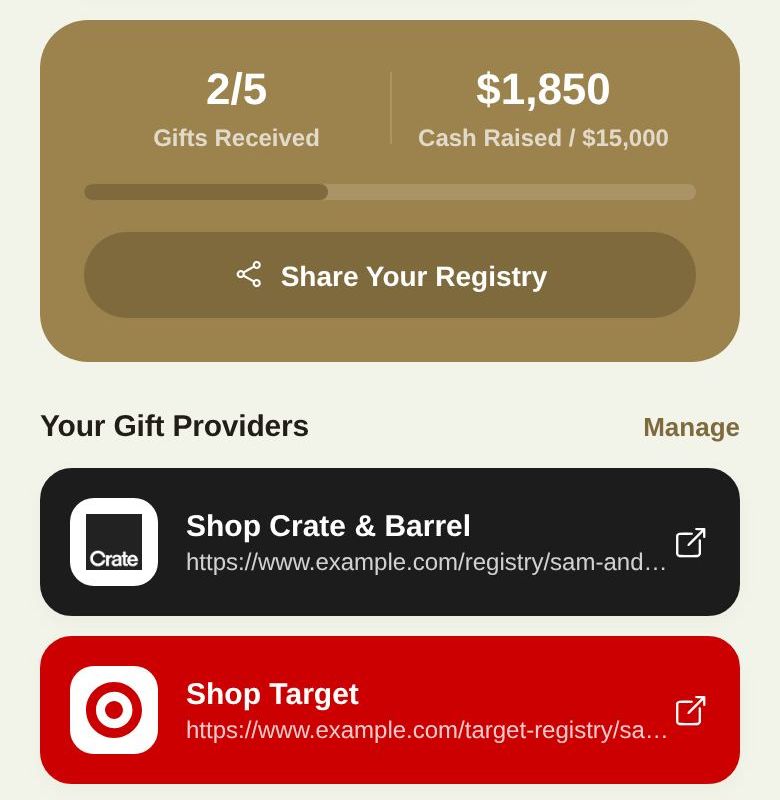
- Gifts Received, like 2/5, with a progress bar.
- Cash Raised across your funds, and your total goal.
- Share Your Registry sends guests a note to open their Guest Passport and tap Registry.
- Your Gift Providers: each store you've linked, one tap away. Manage jumps to Stores.
The bell at the top shows registry notifications: gifts marked purchased and contributions received.
Fees
- Free plan: a 1.5% platform fee on cash gifts paid by card.
- Plus: 0% platform fee.
- Card processing fees from Stripe apply either way. Gifts bought from stores, and money sent by Venmo, PayPal, Cash App or Zelle, carry no fee from us.
Who can manage it
The two of you. A co-planner only sees the registry if you give them access to it, and never sees Payments or Settings. Your day-of coordinator can't see it at all.
What guests see
Did this answer it?
Updated September 30, 2026