Help · For couples · Registry and photos
Download your gallery and keep it longer
Your gallery on the web: download every photo at once, add your own, choose who sees it, and keep it past its included time.
Your gallery also has a private page on the web, made for the big jobs: downloading everything, adding your own photos, and keeping the gallery longer.
To open it, tap Download all, or keep it longer in Photos from your guests. The link is yours alone; guests never see it. If it ever says This link isn't live, open the gallery from The Veil app again to get a fresh link.
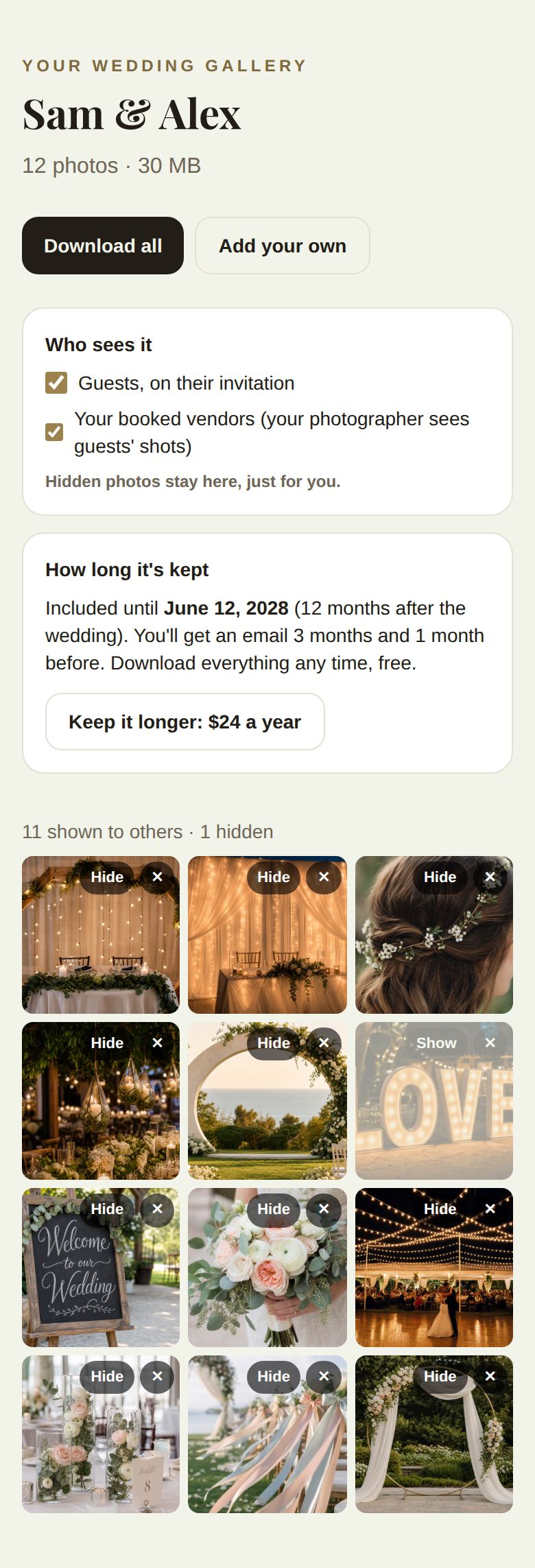
What's on the page
- How many photos you have and how much space they take.
- Download all: every photo, prepared in the browser and saved to your downloads. The page shows its progress, like "Preparing 4 of 12".
- Add your own: upload photos from your computer or phone (and video clips, with Plus).
- Who sees it: Guests, on their invitation, and Your booked vendors (your photographer sees guests' shots). Hidden photos stay here, just for you.
- How long it's kept: the date your gallery is included until, 12 months after the wedding or 3 years with Plus.
- The photos, with Hide or Show and a delete button on each. A line above them counts how many are shown to others and how many are hidden.
Keep it longer
Tap Keep it longer: $24 a year. You pay by card, and the gallery is kept for another year, renewing yearly. Cancel any time and it stays until the date already paid for. Once kept, the page says Kept until that date.
Before anything is removed
We email you 3 months and 1 month before your gallery's included time ends. Download everything free whenever you like. If you don't keep it, the photos are removed after that date.
Good to know
- Deleting a photo here asks you to confirm, and can't be undone.
- Changes here and in the app are the same gallery.
Did this answer it?
Updated September 30, 2026