Help · For wedding businesses · Your business
Your year-end report
The whole year on one printable page: money in by month and by how it was paid, what payments cost, which events paid and where bookings came from (Pro and Studio).
The year-end report puts your year on one page you can print, save as a PDF or hand to your accountant. Open it from Reports (the year-end report link) as an owner or manager. It's part of Pro and Studio.
Choose the year
The buttons at the top choose this year or one of the two before it. In January and February it opens on last year. Print prints the page, or saves it as a PDF from your browser's print dialog.
What's on it
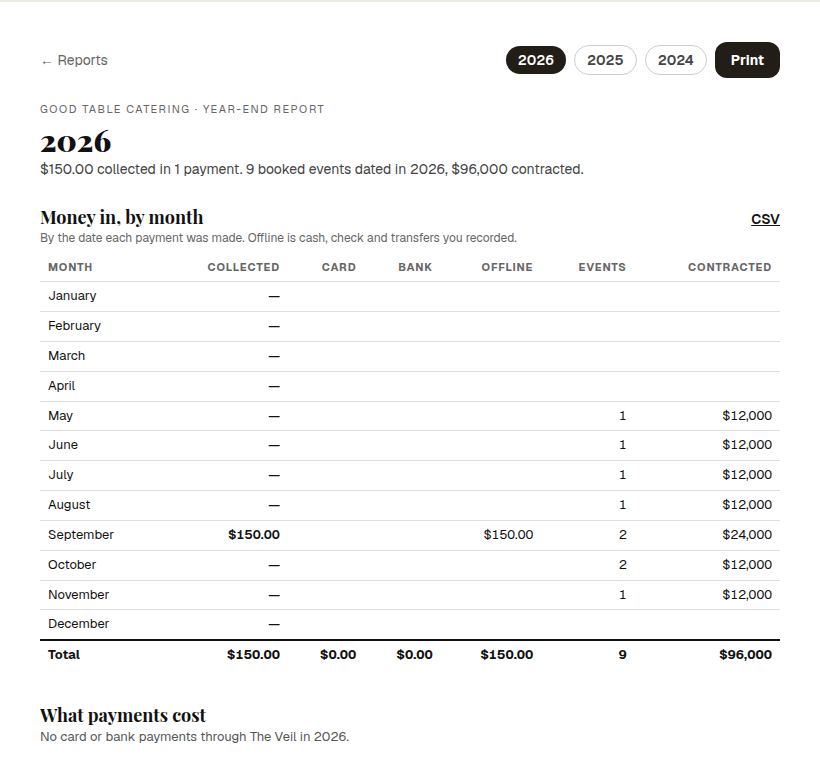
- The headline: what you collected, in how many payments, after refunds, and how many booked events were dated in the year and what they were contracted for.
- Money in, by month: by the date each payment was made, split into Card, Bank and Offline (cash, checks and transfers you recorded), with the events dated in each month and what they were contracted for.
- What payments cost: card and bank payments through The Veil, the fees you paid, and what the same payments would have cost at HoneyBook's published rates.
- By event type: booked, contracted and collected for weddings and other events.
- Where bookings came from: leads that arrived in the year, by source, with how many booked, the rate, the time to book and the booked value.
Each section has a CSV link for the numbers behind it.
Good to know
- It's a summary for your records, not tax advice. Your Stripe dashboard holds the payout detail.
- Payments are counted by the day they were paid; events by the day they happen.
- For the live version through the year, see Reports and Money coming in and revenue by month.
Did this answer it?
Updated September 30, 2026