Help · For couples · Music
Guest song requests
Let guests suggest songs from their passport, then accept or decline each one.
Guests can suggest songs for your reception. You decide what makes the list.
Open or close requests
On your Soundtrack, Guest Song Requests turns requests on or off:
- On: Guests can send you song requests.
- Off: Closed, and guests see the requests tile locked.
Close it once your playlist is set and your DJ has taken over. Only the two of you can change this switch.
How guests request
Guests request songs from their passport in The Veil app. Each guest can request up to 5 songs, and they can see how many requests they have left. Song requests are free. The tile only closes if you turn requests off, and guests then see that requests are closed.
Answer requests
New requests appear under Incoming Requests, with a count of how many are pending. Each shows the song, the artist and who asked.
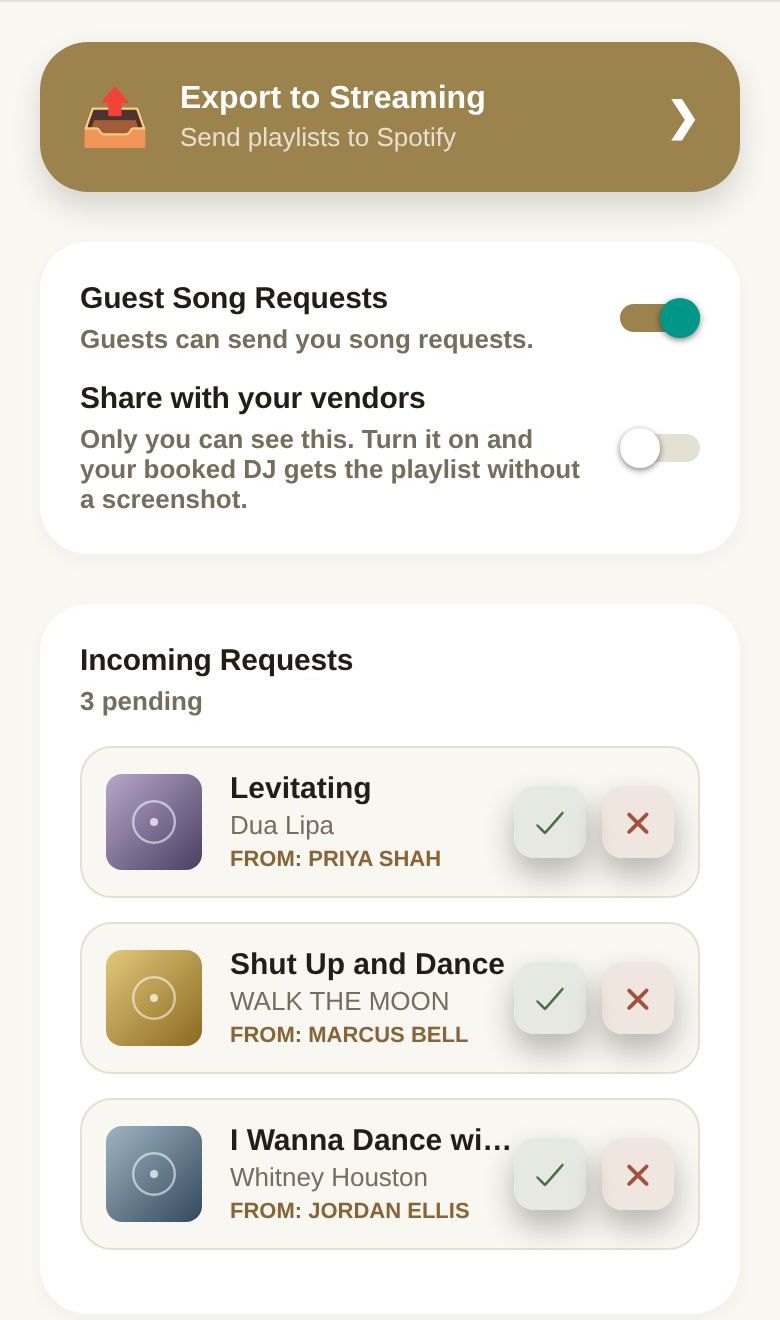
- Tap the check to accept. The song is added to your Open Dance Floor section.
- Tap the X to decline.
Answered requests leave the list.
What your DJ sees
If you share your music with your DJ, they see the songs guests asked for and how many asked for each, but never who asked. Declined requests aren't shared. See Share your music with your DJ.
Good to know
- A co-planner who answers a request sends it to you for approval first.
- Accepting a request doesn't tell the guest; it simply adds the song.
Did this answer it?
Updated September 30, 2026