Help · For couples · DIY Workbench
My Projects: materials and costs
Tune each project's materials, quantities and prices, pick real products, and remove projects.
My Projects is where the projects you're actually making live, with their materials and real costs. The DIY workbench is part of The Veil Plus.
The summary
At the top, Spent, Budget and Left show your DIY totals with a progress bar. Spent is the total cost of your projects' materials; Budget is your DIY Projects budget from Budget.
Two lists
- Custom Projects: projects you created yourself. Tap + Add to make one. See Create and share your own DIY project.
- Added from Discover: catalog and community projects you added, marked Added.
If you've shared projects from another build, a third list, Shared to Community, lets you manage them here too: Add to This Build, Edit, or Take Down.
Materials
Tap Materials on a project to open its materials list.
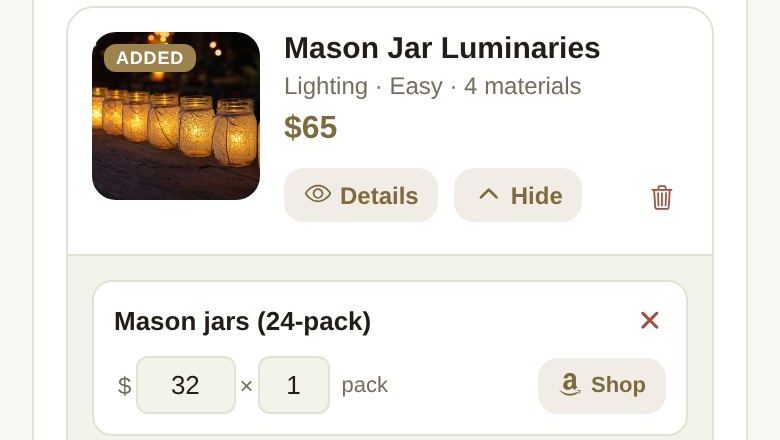
For each material you can:
- Rename it in the name field.
- Change the price per unit (after $) and the quantity (after ×).
- Tap Shop to search Amazon. In Shop on Amazon, search and tap Use this on the product you want. The project then shows that product, with View on Amazon, and the button becomes Change.
- Tap the x to remove the material.
Tap Add Material for something the project didn't list. Tap Hide to close the list. The project's cost, your DIY totals and the DIY line in Budget update as you go.
Details, edit and remove
- Details shows the project card with the tutorial, Your Cost, and the materials with View product links.
- On custom projects, Edit reopens the project and Unlist takes a shared one off the community.
- The trash icon removes a project, after Remove project. Removing a custom project that you shared also deletes it from the community.
Good to know
- If live Amazon search isn't available, the shop window shows starter ideas instead: "Live search is unavailable right now — showing starter ideas."
- Removing a project doesn't remove its build day from your checklist. Delete that task yourself if you don't need it.
Did this answer it?
Updated September 30, 2026